Blender
 Cinema 4D
 Arnold
 3ds Max
 Houdini
 V-Ray
V-Ray Maya
Maya Unreal Engine
 Nuke
NukeOctane For C4D Tutorial: How To Make A Strange Cube
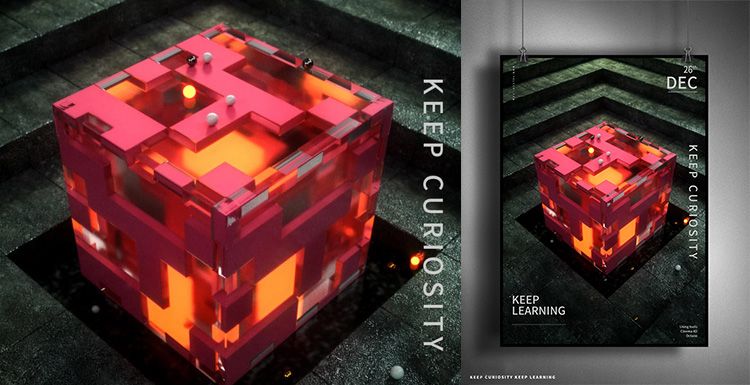
As the leading cloud rendering services provider and GPU & CPU render farm, Fox Renderfarm is here to share with you a Octane for C4D tutotial.
It is not difficult to make the above-mentioned block effect. It is mainly the application of the mixed material of Octane renderer. Let us look at how this strange cube is made. The main software that we use including Cinema 4D, Octane renderer and so on.
Firstly, we should create a rounded cube, and a new clone of the cube. In this file, 15 copies are cloned in each axis, because the cube is 100 * 50 * 100 px, so the size is 1400 * 700 * 1400 px.

On the premise of selecting the cloned object, create a new motion graphics-effects-simple effector, turn on the attenuation, the attenuation type is square, the attenuation is adjusted to 100%, then adjust the attenuation size, and then adjust the position of the Y-axis parameters. The feeling of layer by layer is coming out.

The material of the ground material under the middle cube of the reference picture is different from the material of the scene. Here, a new plane is placed on top, and a new cube is placed again, placed in the middle, and the rounded corners are also given to a parameter.

The model part has almost been created, and now you can start making the lighting part. Create a new HDR light for lighting.

Firstly, create a new reflective material, modify its color, roughness and reflection intensity to adjust to the appropriate effect. Create a new transparent material, here modified the refractive index, the real effect may be seen when rendering, can be fine-tuned after rendering.

Create a new hybrid material again, mix the transparent material and the reflective material, and add a noise map to select the type of noise as a unit, so that the texture will be displayed in the form of a square, then control the global zoom, brightness, contrast Wait to control the range of the display.
Directly copy the noise map directly to the replacement channel, and the parameters of the replacement can also be adjusted.

I feel that there should be another layer outside the cube, so I copied a cube and slightly enlarged it to give a transparent material. Temporarily hide the two cubes just now, and then create a smaller cube to create a glowing material.

The scene material is a reflection material, where 3 stone texture maps are attached, and the texture can be modified to change the gamma value or intensity depending on the situation. Then the UV map is projected in a cube. The plane below the cube is also a reflective material, then a noise is added to properly adjust the roughness and the intensity of the reflection.

Now set the output size, place the camera, then fill the light, change the color temperature, and if the cube reflects the light.
The cube also needs to add some decorative spheres, create a new emitter and sphere, make the sphere a subset of the emitter, adjust the emitter parameters appropriately, and check the display object. Add the analog tag rigid body to the emitter, apply the inheritance tag to the subset, and select the individual elements. Add the analog tag collision body to the cloned object and the outermost glass cube. Click the play button and the ball will naturally fall on it.

Now add a little depth of field, the effect is almost the same. That's all.

Fox Renderfarm hopes it will be of some help to you. It is well known that Fox Renderfarm is an excellent cloud rendering services provider in the CG world, so if you need to find a render farm, why not try Fox Renderfarm, which is offering a free $25 trial for new users? Thanks for reading!
Reference Source: Https://www.bilibili.com/read/cv2176795?from=search