Blender
 Cinema 4D
 Arnold
 3ds Max
 Houdini
 V-Ray
V-Ray Maya
Maya Unreal Engine
 Nuke
NukeHow to Make the Movie Characters Jiang Ziya With Maya and ZBrush(1)

Fox Renderfarm, the best cloud rendering services provider, will share with you a tutorial from 3d artist Weicheng Lin. The tutorial is about how to make the movie characters Jiang Ziya with Maya and ZBrush.
Hello, I'm Weicheng Lin, a 3D Character Artist. This is the first time I've used Maya and ZBrush to make a 3D character tutorial. This character comes from the animated film Jiang Ziya. The total production time is 4 weeks. In the tutorial, I'm going to introduce the whole process.
When I made the character, the movie "Jiang Ziya" hadn't been released, and all my references could only be found in trailers or posters of some movies. Then I looked for screenshots of the movie and finally chose the gold and white costume.
References

I prefer to follow the reference diagram to find some suitable character model to modify, which can save a lot of production time. In addition, it's best to have a certain knowledge of anatomy when making characters and find a muscle reference map. It's important to note the character's age, body shape, proportion and also remember to check that the model is correct when adjusting.
Model adjustment
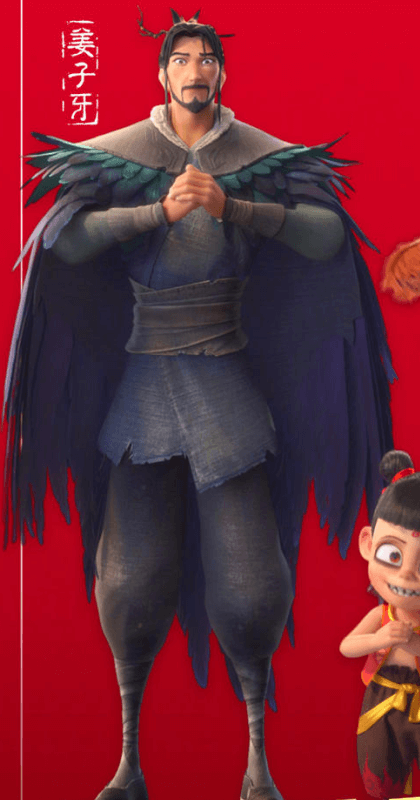
I found a complete body map of Jiang Ziya, a stylized model with a little exaggeration, a small head and shoulders, and thin legs. When I made it, I decided to use a previous model to modify it to the size scale of the reference figure. This process does not need to pay attention to details, as long as the size is prepared.

Clothing
Because most of the body is covered by clothes, after the character's body shape is confirmed, I use the plug-in to copy the body's skin in ZBrush, then adjust it to the right size for the clothes, and then use the brush to adjust the details of the rest.

The first copy of the model served as the underlying garment, and the character had a robe on the outside, so I copied the surface of the underlying garment in Maya and used it to continue making the robe.


I quickly used a low model to make the shape of the robe, and then made a model of the hair. After the garment is pulled out of thickness, we can add some subdivision to carve the folds of the cloth. For a novice like me who doesn't have much experience, wrinkles need a lot of references and try to make the carved texture more natural.


In addition, Jiang Ziya's clothes also have some patterns with different colours. I use masks to extract the patterns and then import them into Maya for topology.

 I then imported the model back into Zbrush to refine the other details of the cloth.