close

Blender vs Fusion 360: Full Comparison for Beginners in 2025

If you’re into 3D printing, you’ve probably spent hours scrolling online looking for the perfect 3D model. But sometimes you just can’t find exactly one quite fit your needs. That’s when you start thinking about making your own 3D models. For 3D printing hobbyists and creators, two programs often come up: Blender and Fusion 360. Both are powerful, but they work in very different ways. 

Choosing the right one can be tricky, especially if your goal is to create models for 3D printing. Don't worry. In this guide, we’ll compare Blender vs Fusion 360, exploring their key differences, features, learning curves, and suitability for beginners and professionals.
blender vs fusion360

1. What is Blender?

Blender is a free, open-source 3D modeling software created by the Blender Foundation. It started as a tool for artists and animators, and over the years it has grown into a full-featured platform for creating 3D content.

You can use Blender to build 3D models, create animations, design visual effects, or even make assets for games. With Blender, you can also render your scenes with realistic lighting and materials using its built-in rendering engines.

For anyone interested in 3D printing, Blender can be used to design your own printable models. You can sculpt objects, fix meshes, and export them as STL or other 3D formats ready for printing.
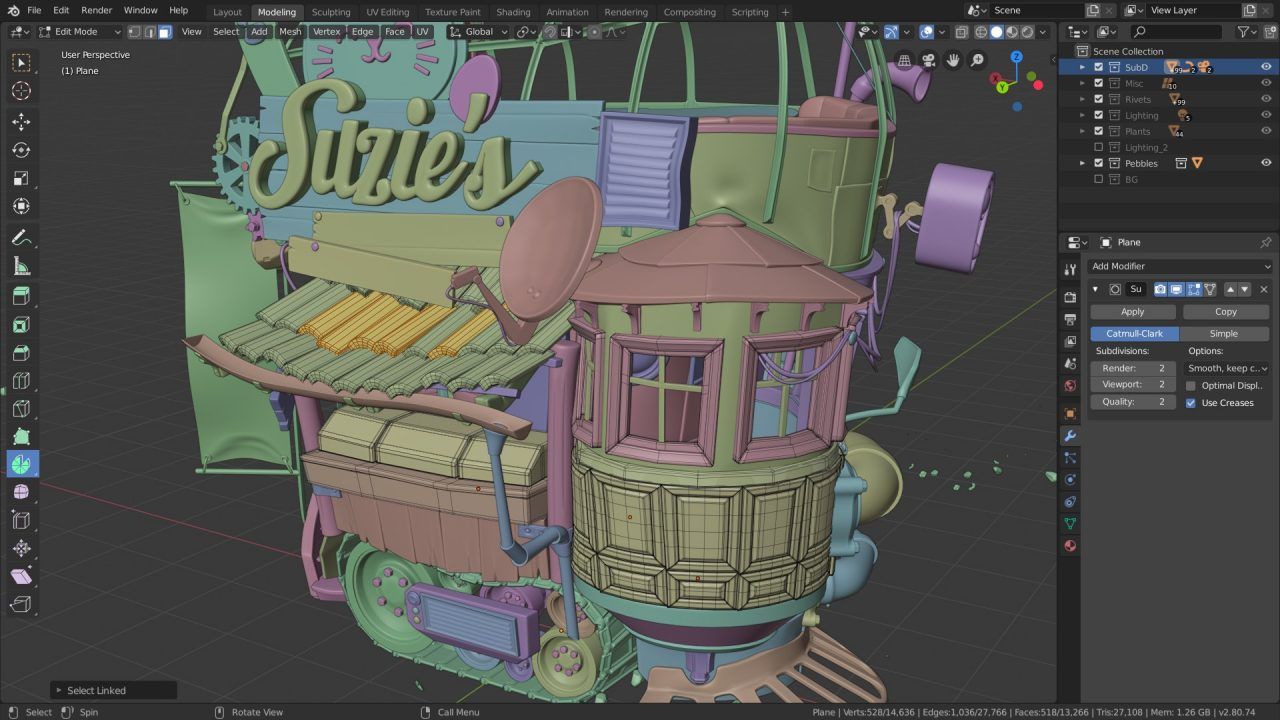
Blender

Image Source: Blender

2. What is Fusion 360?

Fusion 360 is a 3D CAD and CAM software developed by Autodesk. Unlike Blender, it was created mainly for engineers and product designers who need precise control over their designs.

Fusion 360 lets you build models based on exact measurements and constraints, and is widely used for designing mechanical parts, assemblies, and prototypes. So for engineers, makers, and anyone who want to design 3D models that will actually be manufactured or 3D printed, Fusion 360 is a perfect choice.
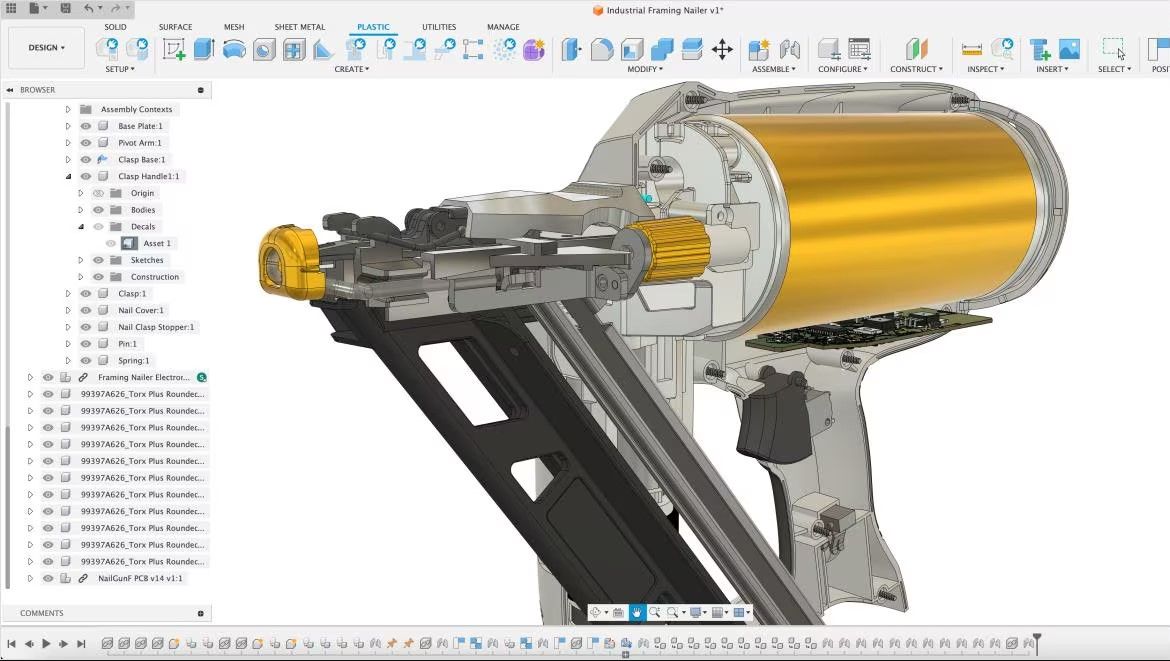
autodesk fusion 360

Image Source: Autodesk

3. Blender vs Fusion 360: Key Differences

When it comes to choosing Blender or Fusion 360, it helps to break down their main differences so you can decide which 3D model software fits your needs. Let’s look at the key points.

3.1 3D Modeling Approach

Blender focuses on free-form modeling. You begin with a simple mesh such as a cube or sphere, then shape it in 3D space using tools like move, extrude, or inset. You can also use its modifier stack, like a Subdivision Surface modifier or a Solidify modifier, and tweak or remove them whenever you want. However, Blender doesn’t provide the detailed step-by-step history that some CAD softwares do.

Fusion 360, on the other hand, uses a parametric approach: start with a 2D sketch, draw lines and shapes with exact dimensions, and then turn that sketch into a solid 3D object using tools like extrude or revolve. The most flexible part of this workflow is that you can go back and change any dimension at any time, like the diameter of a hole, and every related part updates automatically.

In short, Blender’s 3D modeling style tends to artistic and visual creation, while Fusion 360 is built for manufacturing and precision-driven design.

3.2 Use Cases

Blender is great for:

  • Creating characters, monsters, props, or any organic and complex shapes.
  • Making animations, short films, or game assets.
  • Adding visual effects (VFX) to a project or doing cinematic rendering.

Fusion 360 is commonly used for:

  • Product prototypes, mechanical parts, or precision components (like pieces prepared for 3D printing).
  • Engineers, manufacturers, or makers designing functional parts.
  • Generating CNC toolpaths, running simulations (stress or motion), and creating assemblies where multiple parts work together.

3.3 System & Hardware Needs

Blender:

  • OS:
    • Windows: minimum Windows 8.1 (64-bit), recommended Windows 10 or 11. 
    • macOS: minimum macOS 11.2, recommended macOS 14. 
    • Linux: any 64-bit distro with glibc ≥ 2.28.
  • CPU: minimum 4 cores (SSE4.2 support), recommended 8 cores.
  • RAM: minimum 8 GB, recommended 32 GB.
  • GPU: minimum 2 GB VRAM with OpenGL 4.3 support; recommended 8 GB VRAM.
  • Internet: no Internet connection required.
  • Storage: no installation needed.

Fusion 360:

  • OS
    • Windows: 64-bit (e.g., Windows 10 or 11). 
    • macOS: macOS 12 Monterey or later; some versions require Rosetta 2 on Apple Silicon.
  • CPU: 64-bit processor (32-bit not supported), multi-core and high clock recommended.
  • RAM: minimum ~4 GB, smoother experience with 8 GB or more.
  • GPU: must support DirectX 11 (Direct3D 10.1+), recommended discrete GPU with 1 GB+ VRAM.
  • Internet: some features rely on cloud services, so a stable connection is required.
  • Storage: installation needs roughly 3–8 GB depending on version and cache.

3.4 UI & Workflow Layout

For beginners, Blender’s UI can feel pretty overwhelming the first time you open it. You’ll need some time to get used to the different layouts and modes, like Object Mode and Edit Mode. But once you get the hang of it, Blender’s interface is incredibly flexible. 

It’s made up of multiple panels, like the 3D Viewport, Timeline, and Properties panel. You can drag them around or create multiple workspaces, one for modeling, another for animation. Most actions can also be done with keyboard shortcuts, like G to move, R to rotate, and S to scale.
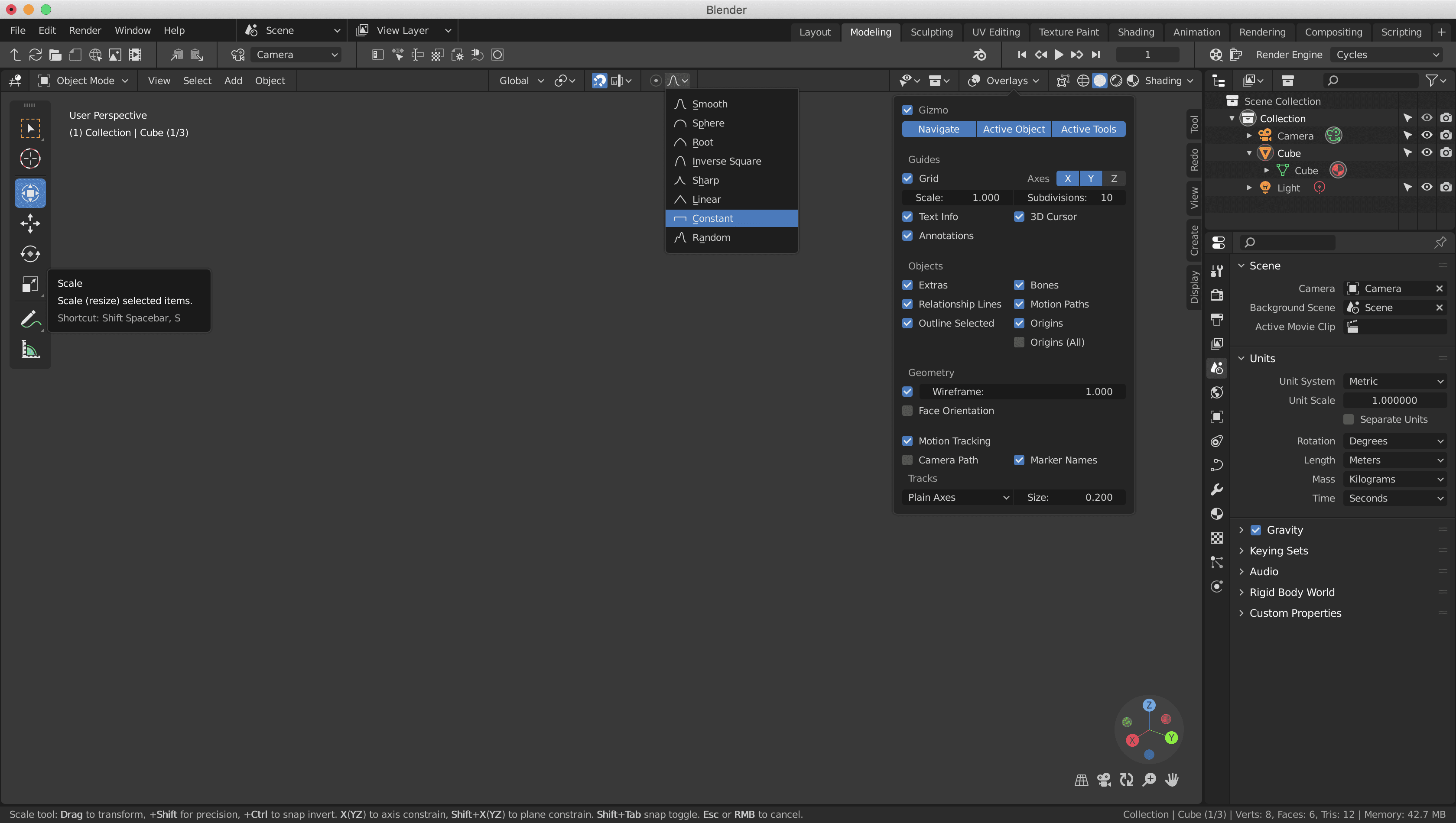
blender ui

Image Source: Blender Devtalk

Fusion 360’s UI is more friendly if you’re new to CAD. It’s very structured, with a clear “Design → Simulation → Manufacture” workflow. When modeling, you work with Sketches, Features, or Assemblies. The left side usually shows the Browser, which displays the feature tree or timeline to help you manage each step of your model. The top has a Toolbar with common commands like extrude, revolve, or chamfer.
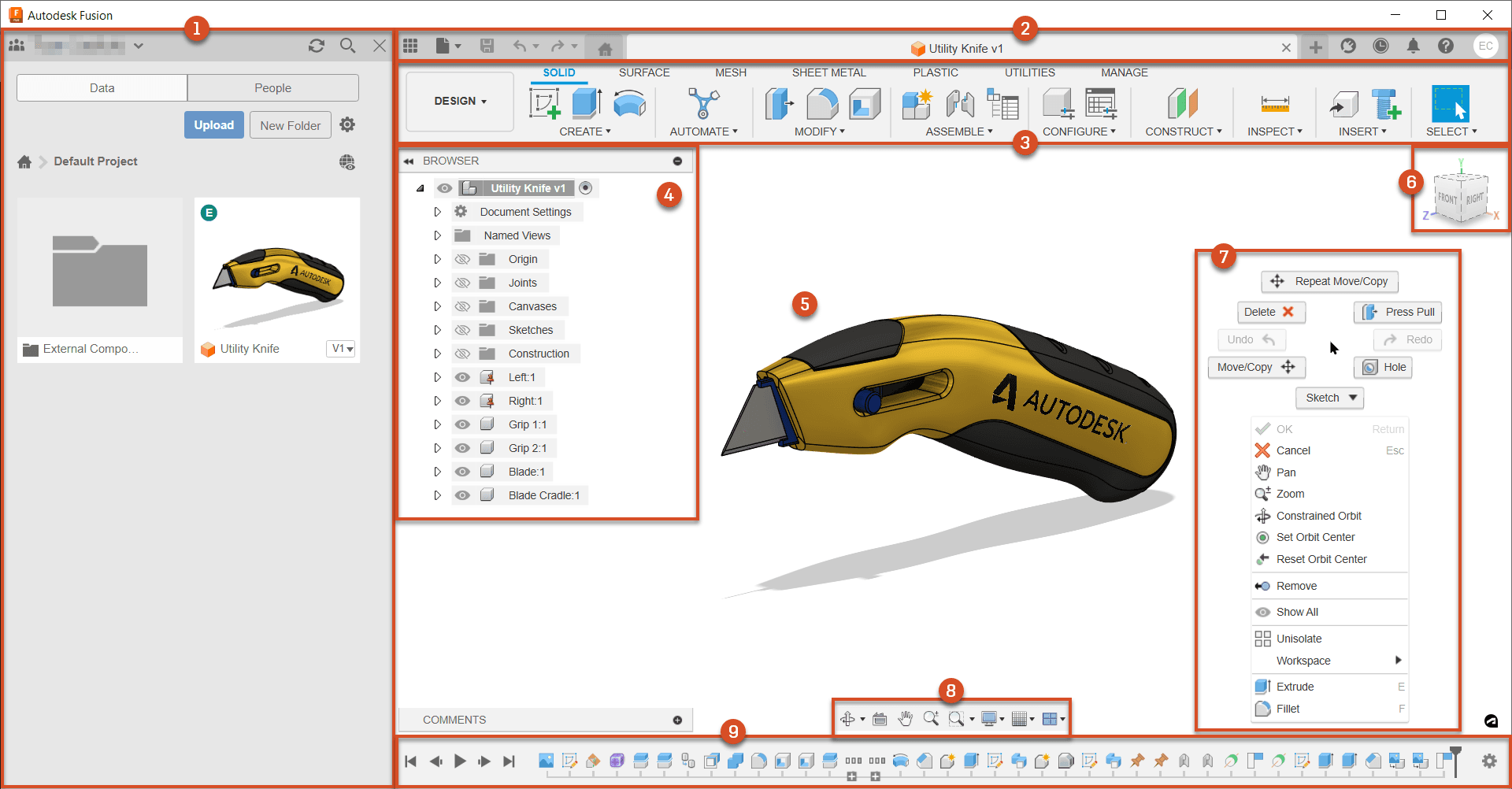
autodesk-product-documentation.png

Image Source: Autodesk Product Documentation

3.5 Built-in Rendering Features

Blender comes with three built-in render engines: Cycles, Eevee, and Workbench. Cycles is a path-tracing renderer that produces highly realistic images with true-to-life lighting, shadows, and materials. Eevee is a real-time engine, offering instant feedback and suitable for quick previews, animations, or interactive scenes. Workbench is a professional viewport renderer mainly used for layout previews, letting you quickly check shapes and structure, but not intended for final image output.

If you plan to work on large Blender renders, a cloud render farm like FoxRenderFarm can help speed things up a lot without stressing your own hardware.
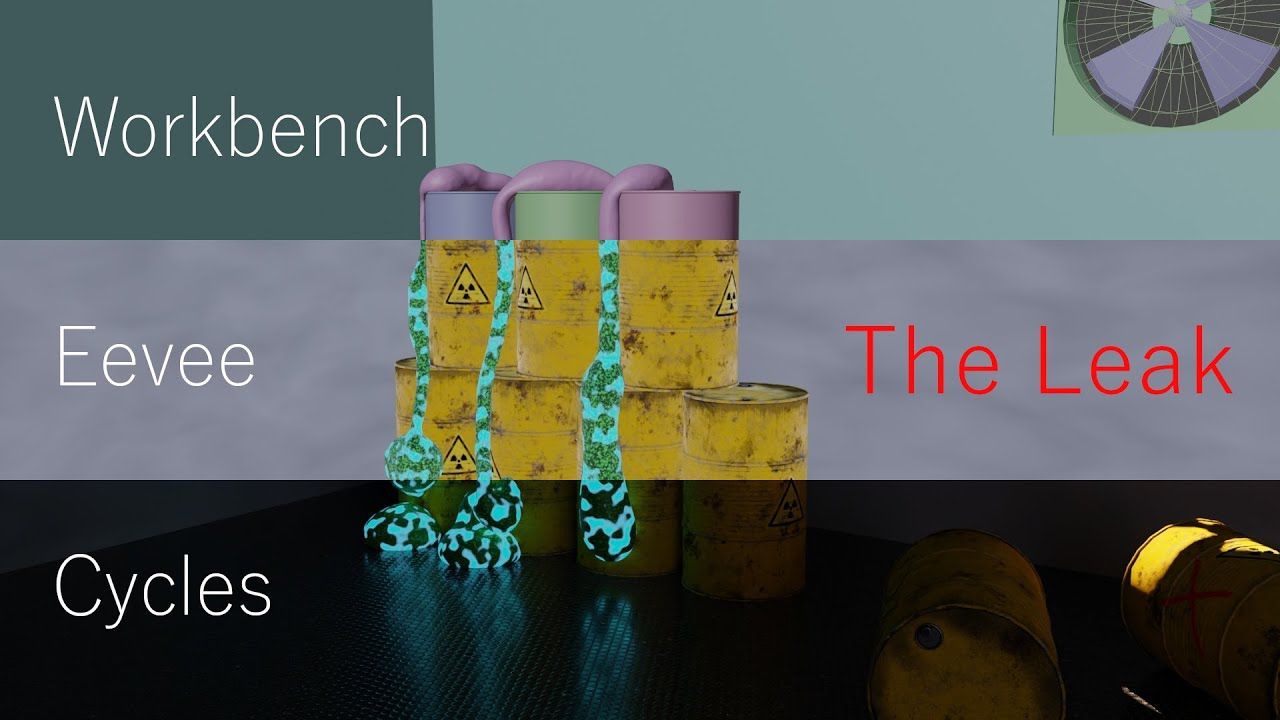
reddit-the-leak.jpg

Image Source: Reddit The Leak

Fusion 360 also has a rendering workspace. You can add materials like metal or plastic, set up lights, then choose to render locally for free on your computer or use cloud rendering (paid) via Autodesk’s servers. Fusion 360’s rendering is mainly for product visualization, rather than focusing on complex animation or visual effects like Blender.
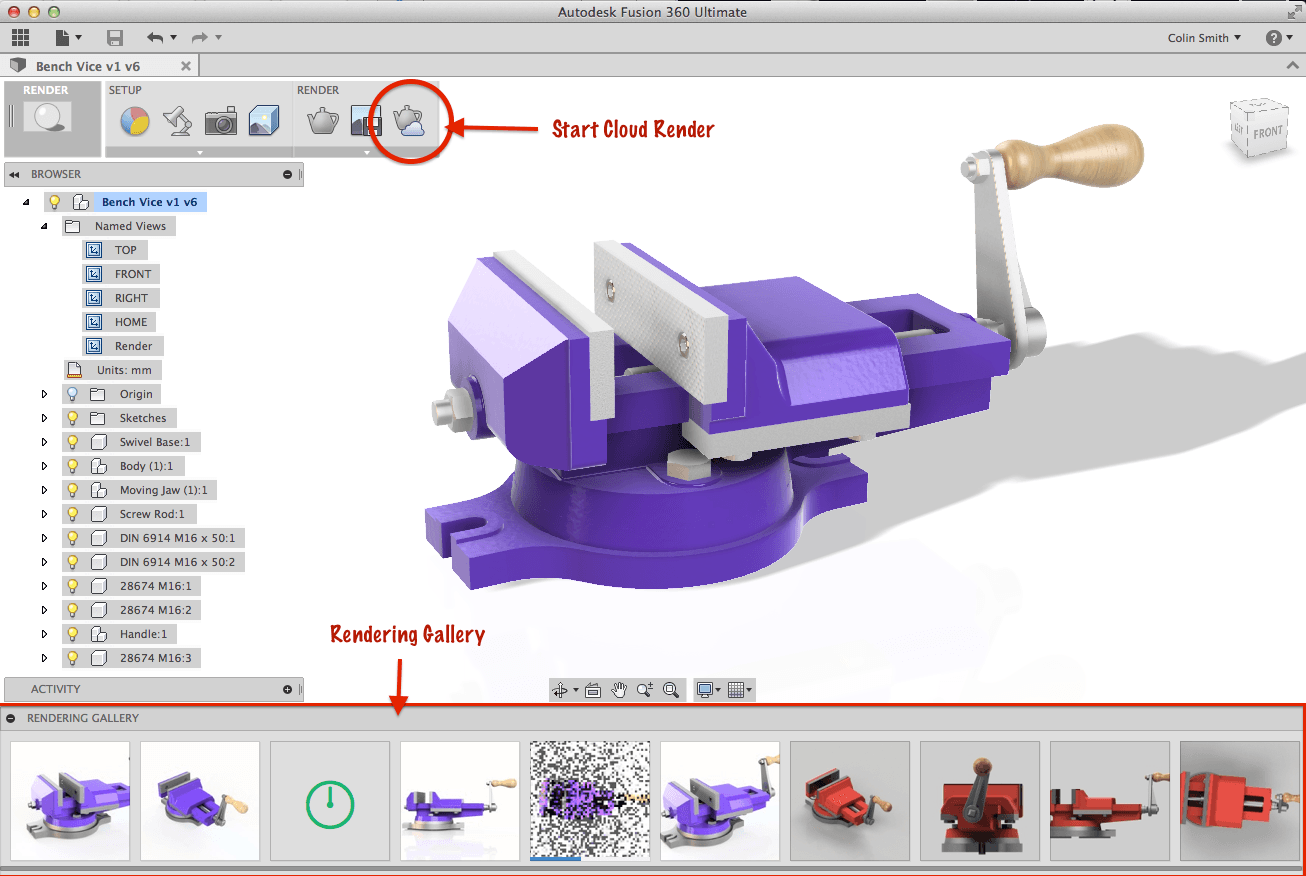
autodesk.png

Image Source: Autodesk

3.6 File Outputs

Blender supports a wide range of common formats such as FBX, OBJ, and GLTF, and can also export STL, which is one of the most commonly used formats for 3D printing.

Fusion 360 supports manufacturing and CAD-oriented formats like STEP, IGES, and DWG, as well as STL. This makes it very suitable for exporting models for 3D printing or professional manufacturing workflows.

3.7 Learning Curve

Blender can be challenging to get started with so many interface options and complex features. If you’re a beginner, you’ll need to spend time learning the basic operation. But once you get the hang of it, you’ll have freedom to express creativity.

Fusion 360 is more beginner-friendly for those with an engineering or CAD background, as parametric modeling and the workflow (Design → Manufacture) are quite intuitive. For complete beginners, the basic sketching and feature operations are not too hard to learn, but mastering advanced functions like CAM may take more time.

3.8 Community & Learning Resources

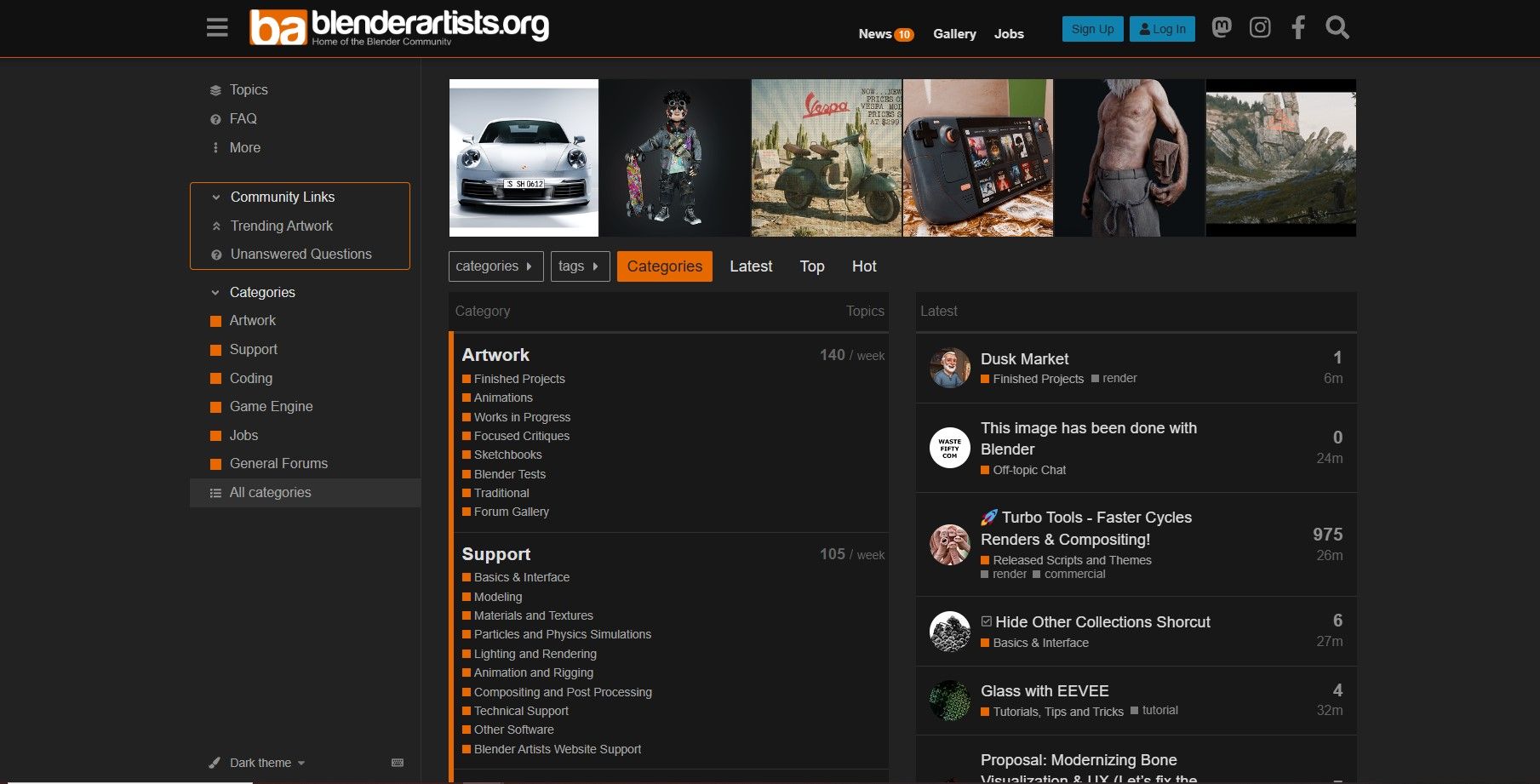
The most valuable part of Blender is its community, Blender Artists, offering a vast amount of high-quality learning resources and beginner tutorials, as well as numerous plugins created by developers. On social platforms, the r/blender subreddit on Reddit is very active, with daily posts showcasing works, tutorials, and Q&A. YouTube has countless dedicated Blender tutorials channels, such as Blender Guru, CG Geek, and Ducky 3D.
blender-artists.jpg

The core of the Fusion 360 community is the official Autodesk forum. Although it’s not as large as Blender’s, it is highly professional. Many community members are engineers, mechanical designers, CNC operators, and manufacturers. In addition, Autodesk’s product managers, engineers, and support teams actively answer questions on the forum. Fusion 360 also has a App Store offering verified third-party plugins and resource libraries. On YouTube, there are also many Fusion 360 tutorial channels, such as Lars Christensen and Product Design Online.

fusion360 community

3.9 Pricing

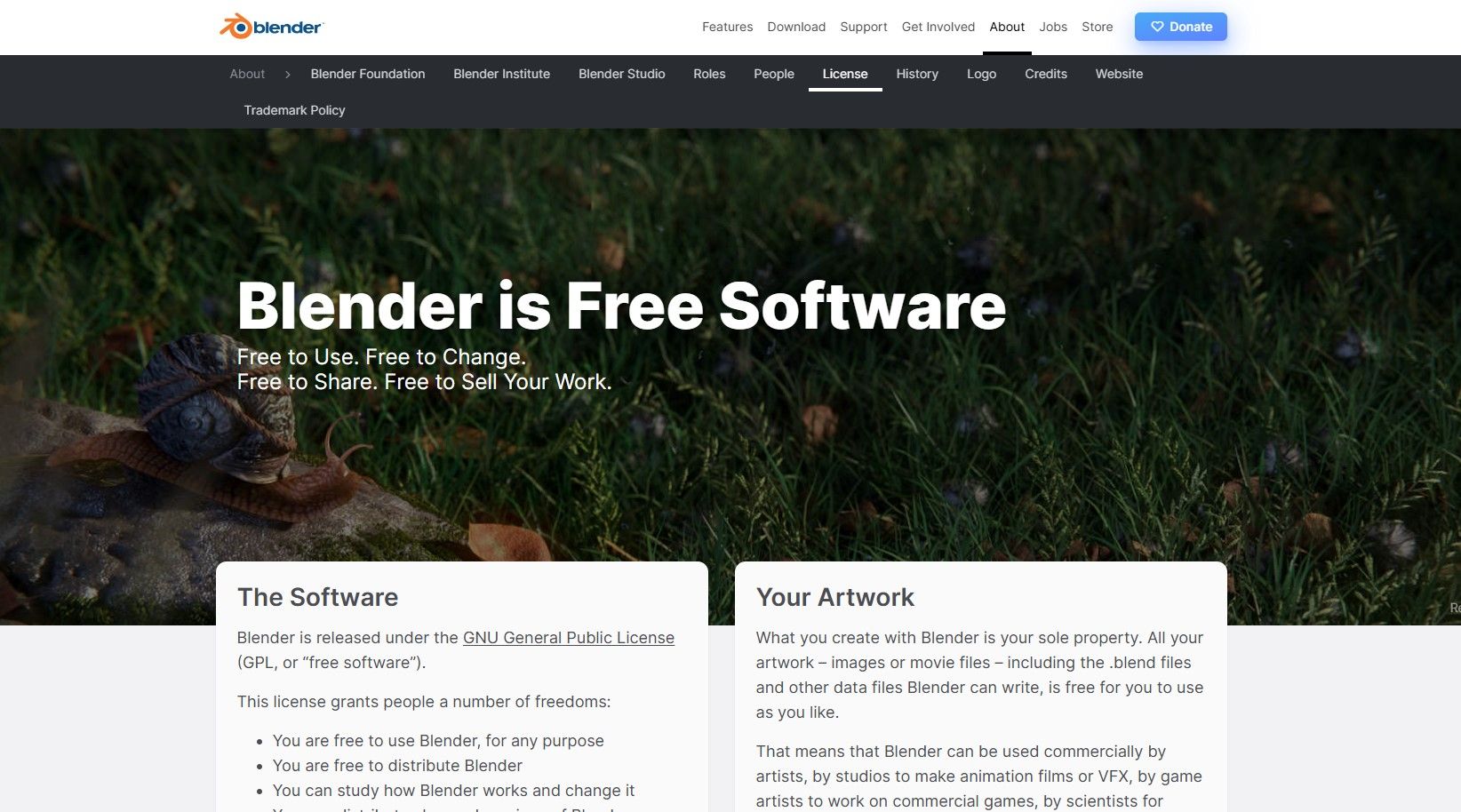
Since Blender is open-source, you can use all of its features completely free of charge, whether it’s for personal projects, education, or commercial work.
blender-free.jpg

Fusion 360 offers both paid and free plans:

  • The core commercial plan costs $85 per month, $680 per year, or $2,040 for three years. It also comes with a 30-day free trial, during which you can test all CAD/CAM/CAE/PCB features.
  • Autodesk Fusion provides a free, limited-feature version for hobbyists earning under $1,000 per year, and a full-featured free version for verified students and educators.

fusion360 price

4. Blender vs Fusion 360 Comparison

  Category

 Blender

 Fusion 360

  Cost

 100% free for all uses.

 Paid plans, with limited free versions.

  Modeling Style

 Freeform polygon modeling.

 Parametric, dimension-driven

 modeling.

  Best For

 Art, animation, visuals, organic

 shapes.

 Engineering, mechanical parts,

 product design.

  Precision

 Not ideal for strict measurements.

 Excellent dimensional accuracy.

  Learning Curve

 Harder due to complex tools.

 Easier for beginners.

  Rendering

 Built-in Cycles and Eevee engines.

 Built-in local and cloud rendering.

  Manufacturing Tools

 No native CAM or engineering

 drawings.

 Includes CAM, simulation, and

 drawings.

  File Formats

 FBX, OBJ, GLTF and STL output.

 STEP, IGES, STL, OBJ, and DXF

 output.

  Community

 Huge global creative community.

 Smaller but highly professional user

 base.

  3D Printing Use

 Modeling artistic or organic 3D prints.

 Mechanical prints, creating accurate,

 functional parts.

  Platform Support

 Windows, macOS, Linux.

 Windows and macOS.

5. Can You Use Blender and Fusion 360 Together?

In practice, combining Fusion 360 and Blender allows you to achieve precise engineering and creative modeling in one workflow. Fusion 360 handles precise structures, while Blender is used for refining shapes, adding artistic details, and creating high-quality renders.

Here is a workflow you can refer to:

Step 1: Create the Base Model in Fusion 360

In Fusion 360, create mechanical or parametric models, define dimensions, assemblies, and manufacturing-ready geometry, then export to common 3D file formats like OBJ or FBX.

Step 2: Import the Model into Blender for Styling and Artistic Editing

After importing, use Blender’s modeling, sculpting, and rendering tools to further refine the model. If needed, create UV maps, assign PBR materials, and set up lights and cameras for final stills or animation.

Step 3: Engineer and Final Output

If you need to ensure precise dimensions, return to Fusion 360 to check tolerances, with 0.2–0.3 mm being a common range. If you need to render, return to Blender and use Cycles or Eevee to produce the final images or animations.

6. FAQs about Blender vs Fusion 360

6.1 Can Blender be used for 3D CAD?

No, Blender lacks parametric CAD features like dimension-driven sketches, assemblies, and CAM workflows. So while you can model objects for 3D printing, it is not ideal for professional CAD engineering tasks.

6.2 Which is harder to learn, Fusion 360 or Blender?

Blender is harder to learn because of its complex interface, many tools, modifiers, and sculpting options. Fusion 360 is easier for beginners with an engineering background since its UI and workflows are more structured and intuitive.

6.3 What is the number 1 3D modeling software?

Your purpose determines which software is truly the right 3D modeling tool for you.

  • For engineering and product design, Fusion 360 or SolidWorks win.
  • For visuals, animation, and creative modeling, Blender is extremely popular due to its flexibility and free price.
  • For professional VFX and film, Maya or 3ds Max are top choices.

7. Conclusion

In the end, choosing between Blender and Fusion 360 depends on your goals. Fusion 360 is ideal for mechanical parts, assemblies, and 3D printing with tight tolerances. Blender, on the other hand, is perfect for visuals, animations, and creative 3D printing projects.

For faster and high-quality renders, you can also try Fox RenderFarm, which fully supports Blender and speeds up your rendering workflow.

Interested

Which is Better, Maya or Blender?
If you want to learn about 3D, then you must have heard of Maya and Blender, both are commonly used 3D software, but which one is better? Here's an article about the difference between Maya and Blender from the best cloud rendering provider and render farm, Fox Renderfarm.What is Maya and what is Blender?Maya is a 3D computer graphics application developed by Alias Systems Corporation and currently owned by Autodesk, Inc. It runs efficiently on Windows, Mac OS, and Linux. Maya is used to create various things such as video games, animated movies, TV shows, visual effects, etc.Maya provides a comprehensive set of tools for modeling, animating, and other 3D creation tasks. Developers can edit and create 3D models in a variety of formats, and then animate those models using the animation tools provided by the Maya suite. The tools can be used to efficiently render realistic images and animated visual effects based on animated 3D scenes.Blender is an open source 3D computer graphics software toolset developed by the Blender Foundation. It is used to create animated movies, visual effects, 3D models and video games. It is available for Windows, Mac OS and Linux.The Blender Foundation is the non-profit organization that actually keeps Blender running and organizes this open source project. Blender has a wide variety of tools for almost any type of media project. With Blender you can efficiently create animated feature films, games, interactive applications, including kiosks and scientific studies.Maya is available to users in an integrated software application that is designed to increase productivity and ease of use. Its software interface is customizable; therefore, skilled developers can take their productivity to a higher level. It allows developers to extend their Maya capabilities by providing access to the (MEL) Maya embedded language. Using MEL, developers can customize the interface by writing scripts and macros.The Best Cloud Rendering for Maya of 2023Blender is a cross-platform application that runs on Linux, Mac OS and Windows systems. Its memory and hard drive requirements are minimal compared to other 3D creation tools, and Blender's interface uses OpenGL to provide a consistent experience on all supported hardware and platforms.A full set of APIs (Application Programming Interfaces) is available to accelerate the features and functionality of Maya. It also provides a Python-based API for those who want to use it.Top 9 Best And Free Blender Render Farms of 2023Blender comes with a wide range of basic tools such as modeling, rendering, animation, video editing, VFX, texturing, rigging, simulation and game creation. Blender adds complexity and jargon. There are multiple terms such as UV mapping, materials, meshes, shaders, etc. which are the artist's medium. Understanding these terms will help developers take full advantage of Blender.Maya Dynamics helps developers create compelling visual simulations. Many more dynamics tools are available. To simulate and render viscous fluids, atmospheres, fireworks, and ocean effects, use Maya Fluid Effects. For clothing and fabrics, the nCloth effect is available, and nParticles can be used for effects including liquids, clouds, smoke, spray, and dust.Author: Ashif AliThe Main Differences Between Maya and BlenderThe differences between Maya and Blender are explained in the following points.1.Maya provides customization through MEL (Maya Embedded Language); interfaces can be extended with it, and Blender embeds Python3 for writing add-ons, binding roles, and more.2.For years, Maya has been the industry standard for 3D modeling and animation, and Blender's 3D painting and sculpting tools cannot match Maya's standard.3.Maya is better suited for large studios, while Blender is ideal for smaller startups.4.Maya has received extensive support from Autodesk and users around the world, while Blender is open source software, which is heavily documented on its website, and the rest of the support is provided through community tutorials.5.Maya exposes a node graph architecture where each node has its own properties and customization, while Blender has a node-based compositor that provides comprehensive video sequencing and post-processing capabilities.6.With Maya, rendering an animation for the first time can be quite a challenge, and Blender can make the rendering process a little easier to render an animation or a series of frames.7.Maya is the industry standard for 3D animation and is used by professionals around the world, while Blender lives in the shadow of Maya and is useful for freelancers and small startup projects.8.Maya is more powerful, but this powerful function comes with a lot of complexity, and Blender can solve some of Maya's complex problems, such as the rendering engine.9.Maya is a licensed product that comes with fewer bugs, while Blender tends to be error-prone, resulting in bugs in every version.10.Maya has a moderate learning curve with a more expressive toolset, while with Blender, it can be daunting when first trying to master the subject matter.Author: Sam Laerte ConclusionThere is no doubt that Maya is the industry standard for 3D applications, and there are good reasons to support it. It is a very powerful program that allows users to model, texture, render, and run simulations and animations. Blender, on the other hand, has always lived in the shadow of Maya and is considered the underdog of the 3D industry. But that doesn't mean that Blender is a worse tool than Maya.Blender is more intuitive than Maya in some ways. The same animations, assets or renders can be created in Maya or Blender. It depends on the skill and efficiency of the developer or artist, which determines the creation of the product.Of course, Blender has many unique features that can help speed up the workflow or make tasks easier. As well, Maya offers certain components that are superior to Blender. Each has its own benefits. Before choosing Maya or Blender, project timelines and costs need to be highly considered. For now, Maya will be much more in demand than Blender for corporate job applications, so if you are changing careers, it is recommended that you choose Maya to learn first.If render farm renders are needed for Maya and Blender, then Fox Renderfarm, which offers leading cloud rendering services, is a great choice. We also offer a $25 free trial for every new user! Thanks for reading!
More
2023-01-13
How to Render High-quality Images in Blender
In this article, the best CPU & GPU cloud render farm and cloud rendering service provider, Fox Renderfarm, will tell you how to render high-quality images in blender.Top 9 Best And Free Blender Render Farms of 2024With the development of computer technology, Blender has been widely used in the field of graphic design, so that ordinary people also have the opportunity to come into contact with Computer Graphics technology referred to as "CG technology". Computer Graphic Image is also computer 3D animation technology, referred to as "CGI". Whether it is "Toy Story", "The Lion King" or "1917", the success of these world-class blockbusters can not be separated from the establishment of models in 3D software, and then to visual effects, post-production software composition, Editing, and more.Image via blendercn.orgAs a new star in 3D software, blender integrates modeling, sculpting, binding, particles, animation, etc., and is a software that supports commercial creation for free forever. So how do we use blender to output high-quality images?Blender has 2 renderers that can convert a 3D scene into a 2D image.Eevee is a physics-based real-time renderer.Cycles is a physically-based ray-tracing renderer.Use plugins to add more third-party rendering engines. Each renderer has its own rendering settings to control rendering quality and performance. And the rendering effect is determined by the camera, lighting,and materials, which also determine the quality of the output images.Image via blendercn.orgHere is the Cycles renderer that comes with Blender as an example. As a GPU-based rendering engine, rendering effects have become more and more mature, and its speed is much faster than the CPU renderer. So where does it affect the output image quality?SamplingThe sampling method determines how the light is calculated. The light is emitted from the camera into the scene and bounces back and forth until they find a light source, such as a light object, a glowing object, or the ambient background light. Number of light path traces for a single pixel in the final render. The more samples there are, the less noise there will be in the result and the more accurate it will be.Path trackingThe rendering attribute is the amount of light emitted from the camera to each pixel. The view attribute is used for scene rendering in the view. A value of 32 means that each pixel will be tracked by 32 rays.)NoiseNoise in the image will greatly affect the image quality because 32 beams of light per pixel are not enough to produce a high-quality image (To reduce the noise by 50%, double the number of lights, so the rendering time will also double, depending on the computer configuration to set the value, at least 1024 if you want a better effect.Rendering propertiesThe rendering properties greatly affect the rendering quality, try to adjust to the maximum value that the view can reach, and adjust the view back to 32 to maximize the quality.Optical Path LengthIt refers to the value of the number of bounces to track the path of each beam. The difference between 0 and the maximum will be very large.Camera PropertiesCamera size: It needs a proper ratio and size, and the focal length needs to be adjusted according to the content of the image. The appropriate size can display the details of the Depth of field.Depth of field: The choice of lens will affect the depth of field details. The depth of field determines how far away the object will be displayed clearly.Aperture radius: determines how far the object in the radius is clear, and it will become blurredFocus: Focus needs to be adjusted. Set important objects in the image as axes and adjust the appropriate aperture radius to show the correct object to the viewer.If you want to improve the quality of the images, you can try some of the suggestions above. Improving the quality of images is not something that can be improved by reading an article. Continuous learning and practice is the best way.Cycles is undoubtedly a young renderer. Blender is also constantly improving some of the features of Cycles, and it has a lot of room for development in the future. As a TPN-accredited render farm, Fox Renderfarm supports most mainstream 3D software, renderers, and plugins, including Blender, 3ds Max, Maya, Cinema 4D, Unreal Engine, and more. So if you want to use a renderer other than cycles, you can also consider Fox Renderfarm, which is undoubtedly a powerful, fast and safe render farm. It can easily help you render high-quality images in Blender.Fox Renderfarm hopes it will be of some help to you. It is well known that Fox Renderfarm is an excellent cloud rendering services provider in the CG world, so if you need to find a render farm, why not try Fox Renderfarm, which is offering a free $25 trial for new users for signing up? Thanks for reading!
More
2024-12-04
ZBrush Tutorial: A Sharing of 3D Stylized Cheongsam Women
In this article, Fox Renderfarm, the best cloud rendering provider and render farm, will share with you Pierson Pang's works of stylized cheongsam girl and approximate production process and experience.Pierson Pang is a 3D character designer who has participated in many AAA realistic and stylized projects in Europe and America, specializing in European and American cartoons and realism.© Pierson PangHe mainly uses the software ZBrush and Blender. Use the sculpting software ZBrush with the emerging set of modeling to render in Blender, can maximize the production efficiency.First look at the final result:© Pierson Pang© Pierson Pang© Pierson Pang1. Ideas and Reference CollectionPierson initially wanted to do an exercise in generalizing the female body. He combined Chinese femininity and chose the cheongsam for the costume. But at the same time, he wanted to maximize the female form, so made a little change to the cheongsam's shape. Because there was no specific original drawing, he looked for some reference drawings that fit the image in his mind before making it.He looked for exaggerated anatomical drawings of the form as well as fashion show type for reference, which determined the final direction of the character's temperament. Although there are often improvised ideas in future productions, they are within the larger framework. That's why accurate reference is important, as it guides the right production direction.© Pierson Pang2. Making the ModelCompared with realistic characters, the model of stylized characters requires more general refinement and exaggeration of human silhouette structure and muscle anatomy, and focuses on the overall relationship of sparseness, rhythm and hierarchy of the character. And the stylized character will first discard the irrelevant details.A little advice for beginners:If you want to exercise sensitivity to body type, then you can do a lot of body type generalization exercises at first, including various body types (fat, thin, women of various body proportions).Like the following figure: this combination of deformation through the simplest of spheres will maximize the removal of details, thus focusing all attention on the characteristics of the shape itself. Strengthening this exercise will quickly improve one's ability to capture the shape. The same applies to the character's face, which will be more delicate and faint compared to the larger forms.© Pierson PangBack to the cheongsam girl, Pierson did volumetric generalization on the body shape (elbow joint, knee joint, interpolation generalization between each muscle), emphasizing the contrast between the block structure and the curves of the legs and upper arms.In the profile form, the fullness and curves of the arms and thighs need to be noted.For blocky hair, you need to pay attention to its rhythmic contrast such as sparse and dense layers. The volume structure of the face is mixed with softness and hardness, so it needs to be interspersed to deal with it.Regarding facial treatment, there are various styles of cartoonish block treatment depending on the project.Pierson's way is a combination of soft and blocky interspersed treatment, meaning that there is a sense of breathing. In fact, this sense of breathing is throughout the body in his work. How to grasp the overall rhythm? How to choose the detailed contrast of the specific partial rhythm under the overall rhythm is needed to be carefully examined.© Pierson PangAfter the model is almost done, you can directly use ZBrush to paint the vertex color to observe the character effect.Pierson has always felt that the white model does not represent the end of the high modeling stage. The top color is needed to judge the character's temperament, and painting the top color usually requires learning more about women's makeup. The choice of eye shadow type, the choice of lipstick number, what kind of character positioning and temperament they correspond to, are all very sophisticated and also exercise aesthetics. So you can observe more during your day. The aesthetics of a character's final effect is very important. The software and method skills are all auxiliary. The level of completion of the vertex color can be based on your own preferences, as long as you can roughly express the feeling of the character on the line, or to handle finely, as a base for post mapping.In ZBrush, you can use the skin material ball to observe the effect, as follows:© Pierson PangAfter the Tpose effect is determined, use ZBrush's Transpose Master to give the character a pose, but many people prefer to use DAZ to make it because it is more convenient. Transpose Master is more difficult to pose with, but can exercise dynamic anatomical ability.© Pierson PangPierson usually does not put too much effort into the practice of low-poly modeling and the process behind it, as long as it can express the effect he wants to achieve. Pierson used to paint the vertex color with ZBrush and import it into Blender to render the picture by using the vertex color with the material ball. Of course, it is also possible to draw mapping in a more detailed way to adjust the effect in Blender.3. Blender RenderAbout the renderer, he earlier used Keyshort, V-Ray and such renderers, as well as Arnold, which is used by many people to do realistic rendering. Blender is a free software with less complex material and lighting properties compared to Arnold, including WYSIWYG rendering speed and render quality, which are friendly to stylized characters.Blender has two rendering methods: eevee and cycles.Eevee is Blender's real-time rendering engine, implemented using OpenGL technology to focus on speed and interactivity while achieving the goal of rendering PBR materials. Eevee can be used interactively in 3D viewports and can also generate high-quality rendering.Eevee uses the same shader nodes as cycles, making it easy to render existing scenes. For cycles users, you can use eevee to preview material effects before using cycles to render the final image to improve efficiency.Unlike cycles, eevee is not a ray tracing engine. It uses multiple algorithms via rasterization to estimate how the light acts with the object's material, while cycles is based on physical ray tracing to calculate the bounce of each ray. Although eevee is designed to use PBR shading materials, it is not perfect. Cycles renderer provides physically more accurate rendering, while Eevee uses rasterized rendering so it has significant limitations.Each of these two rendering methods has its own features and can be chosen according to your character rendering needs.You can read the official tutorials for details:https://docs.blender.org/manual/en/3.3/render/lights/light_object.htmlrenderer-settingsThere are also many Blender tutorials on YouTube, such as:https://www.youtube.com/c/DannyMac3dYou can check out more works of Pierson Pang at at his Artstation:https://www.artstation.com/piersonpangFox Renderfarm hopes it will be of some help to you. We are an excellent cloud rendering services provider in the CG world, so if you need to find a Blender render farm, why not try Fox Renderfarm, which is offering a free $25 trial for new users? Thanks for reading!By Thepoly
More
2022-10-27
Business Consulting

Global Agent Contact: Evan Zhang

Email: evan.zhang@foxrenderfarm.com

Marketing Contact: Evan Liu

Email: evanliu@foxrenderfarm.com

Message Us:
Newsletter
Keep up with our latest software updates, special offers and events!
Copyright © 2025 FoxRenderfarm.com. All Rights Reserved.