Top 6 Render Engines for 3ds Max: Expert Comparison and Tips
 Ryan Thompson
Choosing the best render engine for 3ds Max can make a big difference in both workflow and final image quality. With so many options available in 2026, from real-time engines to physically accurate renderers, it’s easy to feel unsure about which one fits your project. Not every render engine performs the same, and each comes with its own strengths and limitations.
This guide breaks down the best render engines for 3ds Max, comparing their features, use cases, pros, and drawbacks. By the end, you’ll have a clear idea of which 3ds Max renderer suits your workflow and how to get the best results from it.
Part 1. Quick Overview of the Best 3ds Max Rendering Software
To pick the best rendering engine for 3ds Max rendering at one glance, review the mentioned table:
|
Metrics |
Fox Renderfarm |
ChaosCorona |
Redshift |
Autodesk Arnold |
OctaneRender |
FStormRender |
|
Type |
Cloud render‑farm service for 3ds Max |
CPU render engine plugin for 3ds Max |
GPU‑accelerated render engine |
Built‑in CPU render engine for 3ds Max |
GPU‑accelerated render engine |
GPU‑accelerated render engine for 3ds Max |
|
Speed (Relative) |
Very high (dozens to thousands of nodes in parallel) |
Medium–high (depends on local CPU) |
High (GPU‑based) |
Medium (CPU‑based, production‑proven) |
High (GPU‑based) |
High (GPU‑based) |
|
Hardware Requirement (Local) |
Low–medium (most work done in the cloud) |
Needs a strong CPU and RAM |
Needs a powerful GPU and VRAM |
Needs a strong CPU and RAM |
Needs a powerful GPU and VRAM |
Needs a powerful GPU and VRAM |
|
3ds Max Integration |
Dedicated 3ds Max plugins and upload tools
|
Deep 3ds Max integration |
3ds Max plugin |
Native in 3ds Max |
3ds Max plugin |
Deep 3ds Max integration |
|
Other DCC Support |
Maya, C4D, Blender, Houdini, Unreal, etc. |
Houdini, Unreal, 3ds Max, Cinema 4D (and others in dev) |
Many DCC apps (Maya, C4D, Houdini, etc.) |
Maya, Houdini, etc. |
Many DCC apps (C4D, Blender, etc.)
|
Primarily 3ds Max |
|
Learning Curve |
Low–medium (web panel + plugin workflow) |
Beginner‑friendly UI |
Medium (more technical settings) |
Medium–high (production‑style workflow) |
Medium (node‑based shader workflow) |
Medium (simple UI, but fewer tutorials) |
|
Scalability |
Excellent (thousands of render nodes available) |
Limited by local CPUs |
Limited by local GPUs |
Limited by local CPUs |
Limited by local GPUs |
Limited by local GPUs |
|
Render Cost Model |
Pay‑per‑core/GPU‑hour, free trial credits available |
Per‑license subscription |
Per‑license + GPU hardware cost |
Included with the 3ds Max license |
Per‑license + GPU hardware cost |
Per‑license + GPU hardware cost |
|
Best For |
Large projects, tight deadlines, multi‑machine speed |
High‑quality archviz, simple workflow |
Fast GPU rendering for complex scenes and VFX |
Film/VFX‑quality shading, reliability |
Very fast GPU look‑dev and motion graphics |
Photoreal archviz with simple workflow |
Part 2. Best Render Engines for 3ds Max: Choose the Right Renderer Easily
Those who seek to dive into the details of rendering engines, this section has you sorted. Review the key features and pricing details for each 3ds Max render engine, including pros and cons, and see which one meets your needs.
1. Fox Renderfarm
Best For: Large-scale architectural visualization and high-end VFX, and those who need TPN-accredited security and scalability for 3ds Max engines like V-Ray or Corona.
Fox Renderfarm is a render farm, not a render engine, but it integrates directly with 3ds Max through a dedicated plugin. This means you can use your preferred render engines like V-Ray, Corona, or Arnold, and send render jobs to the cloud without leaving 3ds Max.
With the built-in plugin/menu, you can submit scenes, select frame ranges, and configure render settings directly inside the 3ds Max interface. The system also includes automatic scene analysis to detect missing assets or configuration issues before rendering starts, reducing errors and failed jobs.
Backed by thousands of CPU and GPU nodes, Fox Renderfarm allows you to render complex 3ds Max projects faster without relying on local hardware, making it a practical cloud rendering solution for both large-scale production and everyday workflows.

Key Features
- Supports essential 3ds Max plugins like Forest Pack, RailClone, Anima, and advanced simulation effects.
- Enables multi-threaded file transfer and optimized storage for faster uploads and downloads of heavy scenes.
- Provides a centralized dashboard to monitor jobs, preview frames, pause tasks, and manage rendering priorities.
- ISO 27001-certified infrastructure ensures enterprise-level data security and reliable system uptime.
- Integrates Raysync technology to accelerate large file transfers with stable and high-speed performance.
Pros and Cons
|
Pros |
Cons |
|
Supports renderer for 3ds Max workflows, using a per-core or GPU-hour pricing model with available discounts. |
Processing time depends on queue and node availability during busy periods. |
|
High-speed SSD storage that efficiently removes input/output bottlenecks. |
Uploading large scene files can be slow with weak internet connections. |
Pricing Models
- Features a tiered, pay-as-you-go membership model.
- New registrations typically receive $25 in free credits to run test frames
- If you top up within the first 72 hours of registration, you can earn a 40% coupon bonus.
- Students and educators can often apply for a 50% discount.
- Comes with a calculator to estimate the cost for CPU and GPU rendering.
2. ChaosCorona
Best For: Those who seek to achieve high-end photorealistic interior and architectural skills with an intuitive, artist-friendly workflow.
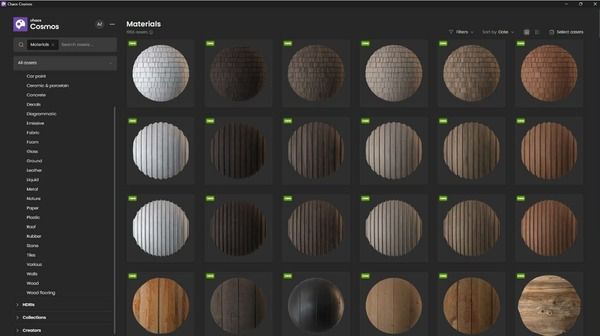
It’s another top renderer for 3ds Max that requires no complex setup and offers a UHD cache, along with realistic lighting and materials. Furthermore, using the Vantage Live Link, you can render images faster and explore scenes in real-time. Artists can also enable Fast Caustics Solver to add reflective, refractive, and volumetric caustics easily. While rendering in 3ds Max, this engine lets you adjust frame buffer lights via LightMix.
Key Features
- Chaos Corona works with many third-party plugins, keeping your workflow tools usable.
- Resumable rendering lets you pause and continue rendering later for a flexible workflow.
- Autosave stores rendering progress in .exr files, protecting work from crashes.
Pros and Cons
|
Pros |
Cons |
|
UI shows tooltips and provides an online manual for guidance. |
No GPU acceleration; Corona relies entirely on CPU cores and speed. |
|
AI Upscaler renders at low resolution and then up-scales to 4K or 8K. |
High hardware cost; fast rendering needs expensive CPUs, unlike cheaper GPU engines. |
Pricing Models
- Chaos Corona uses a subscription-only pricing model, with Commercial and Educational tiers.
- Paying for a full year upfront typically saves you about 20% to 30% compared to monthly billing.
- Massive savings for learners, often costing around $10 or less per month.
3. Redshift
Best For: Fast-paced production and complex animations to handle massive 3ds Max scenes that would crash other engines.
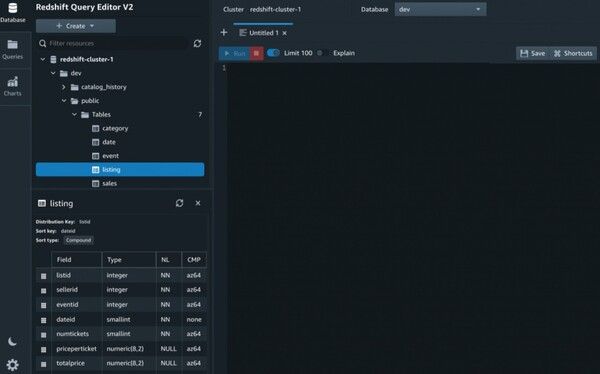
With this 3ds Max render, developed by Maxon, you can visualize your 3D designs through its GPU-accelerated engine. Moreover, it enables artists to render scenes that exceed their GPU’s VRAM by using system RAM as a backup. As for 2024.4.0 versions, its Redshift Live rendering mode is suitable for fast, accurate rendering previews. Alternatively, Redshift Live works in all DCCs, supporting interactive architectural visualization workflows.
Key Features
- Procedural Night Sky creates realistic stars, the Milky Way, and the moon for lighting.
- Enhanced Displacement uses texel density to prevent artifacts and add great detail.
- Deep AOVs give full control over reflections, refractions, and lighting passes.
Pros and Cons
|
Pros |
Cons |
|
Supports almost all 3ds Max features, including plugins and Retopology tools. |
Unlike unbiased engines, Redshift requires artists to manage settings for optimal results. |
|
Redshift lets artists adjust quality for faster rendering without losing detail. |
Uses GPU VRAM heavily; very large scenes may crash or slow down. |
Pricing Models
- No permanent license; you pay a recruiting fee to keep the subscription active.
- Students receive substantial discounts, usually through the Maxon One educational license.
4. Autodesk Arnold
Best For: Rock-solid cinematic VFX and massive, data-heavy scenes, and users who need Monte Carlo architecture that guarantees high-quality results even with billions of polygons.
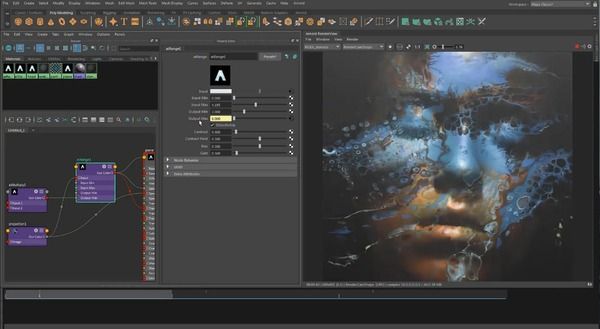
Making 3ds Max rendering seamless, Arnold is known as a Monte Carlo ray-tracing renderer. It lets users view high-quality project previews in 3ds Max, with the option to ray-trace billions of visible polygons. In addition, since it's TPN-Accredited, it's a suitable choice for the high-security needs of major film studios. Unlike other engines, it lets you switch between CPU and GPU rendering with a single click, using the same shader and settings.
Key Features
- Adaptive Sampling targets noisy areas, reducing render time while maintaining high quality.
- OpenPBR Shader supports universal materials, enabling easy asset transfer between software.
- Standard Hair Shader creates realistic hair and fur with accurate light scattering.
Pros and Cons
|
Pros |
Cons |
|
Owned by Autodesk, it comes pre-installed with deep 3ds Max integration. |
Slower compared to biased renderers like Redshift or Octane. |
|
OCIO v2.4 ensures consistent colors across monitors and post-production software. |
Noise removal can take long renders, especially in complex scenes or lighting. |
Pricing Models
- A 30-day free trial is available to evaluate the software.
- This rendering engine follows a subscription-only model, ranging from monthly to yearly (1-3 years).
- Students and educators get free one-year educational access, renewable if eligible.
- One Arnold subscription includes plugins for Maya, 3ds Max, Cinema 4D, Houdini, and Katana.
5. OctaneRender
Best For: High-end architectural marketing and product visualization to get unmatched photographic realism and physically accurate lighting with minimal setup.
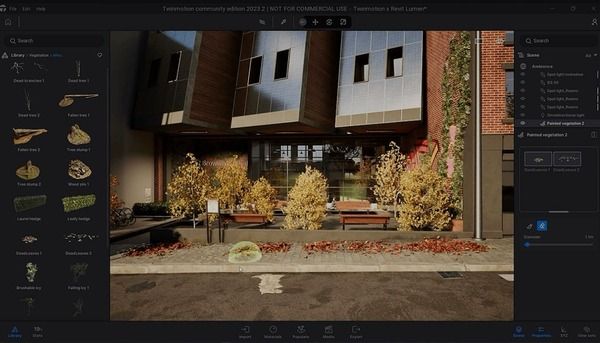
OTOY's OctaneRender is another top renderer for 3ds Max, is unbiased, and supports NVIDIA GPUs. This speeds up rendering 2-5X and supports multiple GPUs to deliver high-quality, photorealistic images by simulating the physics of light. Additionally, layered materials enable users to build complete materials with a base and up to 8 layers. This system ensures physically accurate material creation while reducing the need for manual mixing.
Key Features
- Random Walk SSS and Spectral Hair Material create realistic skin and hair in Octane.
- Vectron™ uses vector-polygon geometry to create infinite GPU-based scenes with no memory use.
- Spectron™ uses procedural volumetric lights with blockers, gels, and barn doors.
Pros and Cons
|
Pros |
Cons |
|
OSL and procedural displacement render robust vertex maps with support for layering. |
Octane needs a full scene in GPU VRAM; exceeding it may crash or slow down. |
|
OSL Shaders now allow textures for absorption, scattering, and emission in volumes. |
Primarily relies on NVIDIA CUDA cores, limiting your hardware options. |
Pricing Models
- This renderer uses a subscription-based model under the “OctaneStudio+” brand.
- Most subscriptions include additional software, such as Greyscalegorilla, KitBash3D, and World Creator.
6. FStormRender
Best For: Architectural interiors that are often faster and more natural than its competitors.
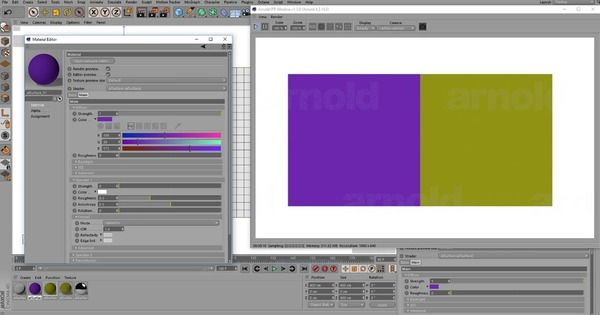
Developed by PinkSoft LTD, this 3ds Max render has been offering speed, quality, and simplicity since 2015. Unlike other rendering engines, FStormRender uses only in-house technology for unique, photorealistic results. Furthermore, it's only available for 3ds Max, and the plugin integrates all necessary features. In addition, it's built-in scene converter safely transfers scenes from Corona, V-Ray, and Octane. It also uses path tracing and tone mapping to produce realistic lighting and shadows.
Key Features
- Built-in glare and bloom create physically accurate light leaks and starbursts.
- Camera-centric controls mimic real photography to adjust exposure and tone directly.
- Real-Time RT mode lets you adjust lights and materials with instant previews.
Pros and Cons
|
Pros |
Cons |
|
FStorm Scatter populates millions of objects with minimal impact on render speed. |
Works only with 3ds Max, not Blender, Maya, or Cinema 4D. |
|
Geopattern tiles 3D geometry efficiently, saving memory without extra polygons. |
Requires NVIDIA GPUs and does not support AMD graphics cards. |
Pricing Models
- One subscription unlocks the full engine and all its features, 30$ per month for one PC.
- FStorm uses floating licenses, letting you share access across multiple machines.
Part 3. How to Render 3ds Max Scenes Faster in the Best Render Engine for 3ds Max
When any renderer for 3ds Max is not enough, a 3ds Max render farm is often the most effective way to render scenes faster. Since Fox Renderfarm supports all 3ds Max rendering engines, like V-Ray, Arnold, Redshift, Octane, and Corona, it's the most suitable choice for accelerating complex projects.
Therefore, the ultimate tutorial below mentions how you can use popular 3ds Max plugins offered by this farm to render 3ds Max scenes efficiently:
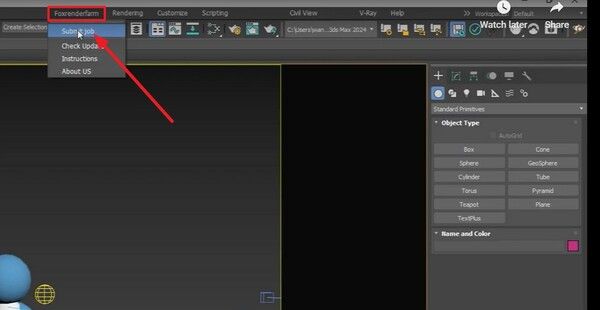
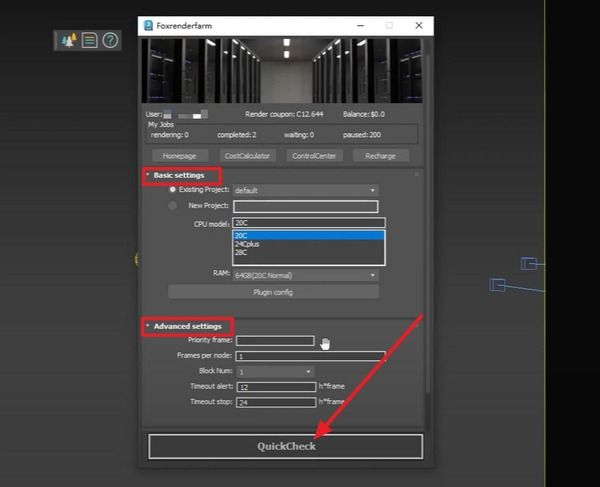
Step 1. Open the Fox Renderfarm client, log in to your account, and launch 3ds Max to open the scene file you want to render. To do that, expand the “Fox Renderfarm” menu in the tool and tap the “Submit Jobs” option.
Step 2. In the pop-up menu, adjust the “Basic” settings and “Advanced” settings as needed, and press the “Quick Check” button.
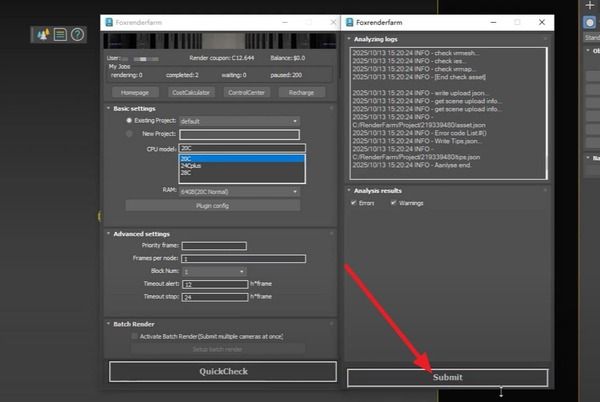
Step 3. When the analysis logs end, pick the “Submit” and then “Ok” buttons from the pop-up.
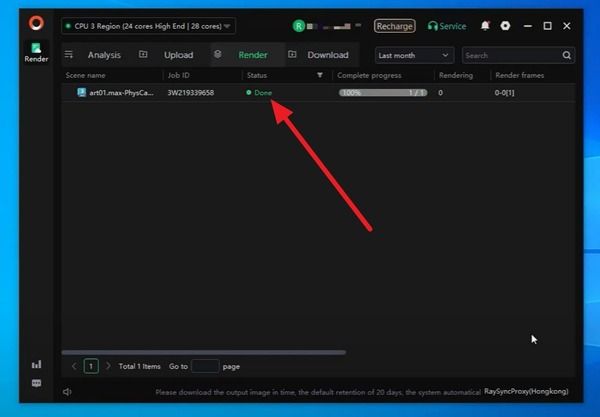
Step 4. Now, go back to the client to monitor the upload progress. Rendering will begin automatically once the upload finishes. As it ends, tap on the "Jobs" section to view the details, and the rendered files will be downloaded automatically upon completion.
FAQs about Render Engines for 3ds Max
1. What is a renderer in 3ds Max?
A renderer in 3ds Max turns a 3D scene into a final image with lights and materials. It uses camera data and settings, so you see realistic outputs instead of raw model views.
2. Why does my 3ds Max render look noisy or grainy?
Noise and grain appear due to low samples, weak light, or complex materials in your scene file. However, you can fix this by using more samples, better lighting, and denoising tools in the settings panel.
3. What are render passes (AOVs) in 3ds Max?
Render passes, also called AOVs, split a scene into components such as shadows, light, and reflections for control. Then you edit each part later; however, there's no need to render the whole scene again for small changes.
4. Is Fox Renderfarm safe for 3ds Max project files?
Fox Renderfarm uses secure systems for 3ds Max files, so your data stays safe during the cloud rendering process. However, always check upload settings, and avoid sensitive 3ds Max data without proper access control.
Conclusion
To sum up, choosing the right renderer for 3ds Max is becoming hectic for artists day by day. Therefore, this simple guide has explained the 6 best options to help you choose the engine that meets your rendering needs and expertise.
For large-scale production, integrating a reliable render farm like Fox Renderfarm can significantly boost performance and reduce turnaround time. By aligning your choice with project demands and system capabilities, you can achieve optimal rendering results without compromise.