Understand the Graphics Rendering Pipeline: A Complete Guide
 Ryan Thompson
Every 3D scene you see on screen goes through a series of steps before it becomes a final image. This process is called the graphics rendering pipeline. When any stage is not handled well, it can lead to slow performance, visual errors, or long render times.
Understanding how the graphics rendering pipeline works is key to improving both performance and visual quality. In this guide, you’ll learn each stage of the pipeline and how to optimize them for smoother and more efficient results.
Part 1. Graphics Pipeline Basics: What You Need to Know
The graphics rendering pipeline is a structured process that converts 3D data into a final 2D image. It clearly explains what graphics rendering is, helping artists understand how scenes are processed and where rendering limitations occur. By knowing this pipeline concept, you can improve workflow and optimize production efficiently.
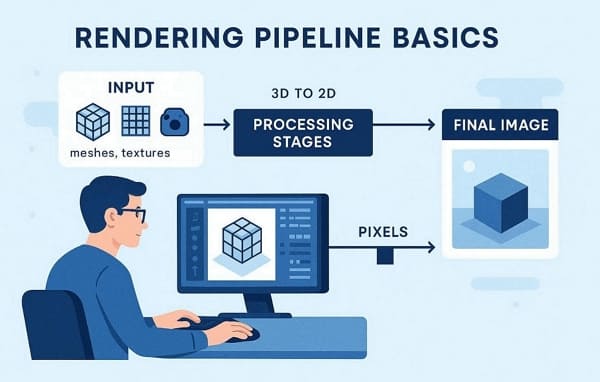
In simple terms, the pipeline starts with input data like meshes, textures, and camera info. Then it passes through stages that transform this data into fragments ready for pixel coloring. Finally, the processed data merges into the output framebuffer, producing the image seen on screen.
Part 2. 6 Key Rendering Pipeline Stages
Systematic breakdown shows how your hardware transforms raw data into final visual frames. So, these 6 technical steps define the standard path for real-time rendering workflow:
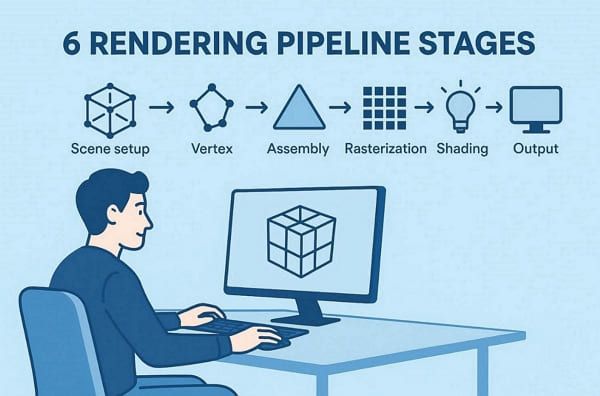
- Scene Setup: The CPU prepares all meshes and textures before issuing several specific draw calls. This initial phase builds the logical foundation for every single active 3D scene.
- Vertex Processing: Afterward, the GPU runs a shader to position each vertex correctly in 3D world space. This geometry stage ensures all model points align with the current camera view perfectly.
- Primitive Assembly: Individual vertices are grouped into basic triangles to define the visible object shapes. Any geometry outside the view frustum is clipped to save valuable hardware processing power.
- Rasterization Phase: The system converts each visible 3D triangle into many individual fragments for display. This critical transition turns mathematical coordinates into pixel positions on your computer screen.
- Fragment Shading: A fragment shader computes the final color for each fragment using complex lighting. This intensive calculation stage applies textures and materials to create a realistic visual look.
- Output Merge: Depth and alpha tests run before the system blends all colors smoothly. The final image data is then written directly into the framebuffer for immediate screen display.
Part 3. Complete Render Pipeline Guide for 3D Artists: Simplified Workflow
A professional production workflow must bridge the gap between creative design and technical execution. Modern pipelines are now built around cloud rendering platforms like Fox Renderfarm to avoid local hardware constraints from the start. The following stages outline the path from initial scene creation to final delivered frames:
1. Modeling and Scene Setup
Artists first build 3D geometry and organize scenes with lights and cameras. Basic meshes form the foundation for all render pipeline processing ahead. In addition to this, complex models prepare data ready for texturing and animation work.
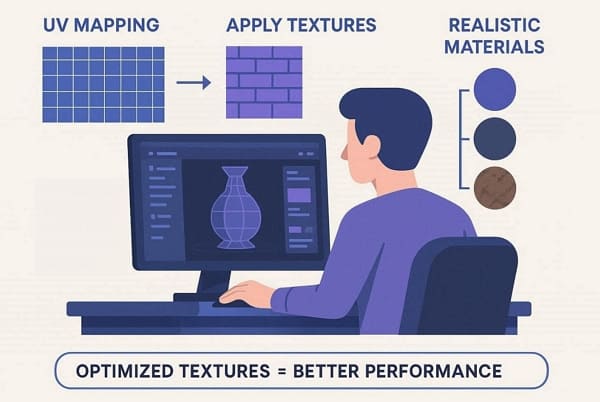
2. Texturing, Materials, and UV Mapping
Apply surface textures and shaders that match the concept art for visual realism now. Upon doing this, UV unwrapping creates seamless maps that perfectly connect to 3D pipeline surfaces. Heavy texture sets load smoothly when optimized early in production.
3. Rigging, Animation, and Lighting Setup
Before the rendering stage, digital skeletons enable character movement through keyframe animation naturally. Lighting positions enhance mood while primitive assembly groups geometry efficiently. As a result, this completes scene data before the render pipeline submission begins.
4. Render Submission
After local preparation, upload .ma/.mb files directly through the Fox Renderfarm plugins. The render farm distributes rendering stages across thousands of GPU nodes instantly for speed. Hence, this eliminates local hardware limits during raster operations pipeline processing.

5. Cloud Processing and Frame Output
Fox Renderfarm handles fragment shading, lighting, and final pixel blending remotely. Moreover, completed frames are immediately download-ready for compositing and client review. So, your render pipeline reliably finishes in hours instead of days.
6. Post-Processing and Final Delivery
Import rendered frames into compositing software for color grading. Then, add sound design, refine visual effects, and complete the final export. Managing this output efficiently determines whether your 3D animation is delivered on time or delayed.
Part 4. Common Rendering Bottlenecks in Modern Graphics Pipelines
Pipeline graphic complexity often overwhelms local hardware during rendering stages. According to researches, about 40% of animation studios report hardware limitations that constrain their overall rendering speeds. Yet, below are a few points that identify the most frequent bottlenecks that stall professional 3D projects:
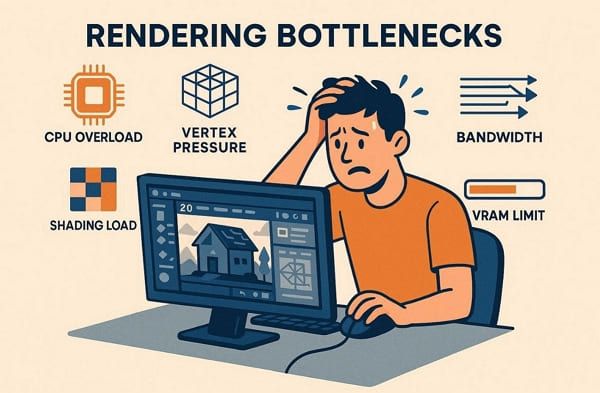
- CPU Overload: High draw call counts often saturate the processor before the GPU starts working. Plus, expensive per-frame tasks, like culling or scene management, slow overall frame submission.
- Vertex Pressure: Dense meshes and unoptimized models increase the total vertex fetch transform costs. Moreover, complex skinning instructions further slow down the geometry stage of your current project.
- Shading Load: Complex pixel shaders with many texture lookups dominate the final fragment costs. Besides, high-resolution effects multiply the workload for every single frame in your sequence.
- Bandwidth Stress: Uncompressed textures overload the VRAM bandwidth and force slow memory fetch cycles. Furthermore, frequent reads for depth and blending saturate the system's high-precision buffers easily.
- VRAM Capacity: Scenes exceeding the available video memory cause the system to crash or lag. This forced paging to slower system memory reduces the overall rendering performance significantly.
To overcome these bottlenecks, professional studios should offload the heaviest rendering work offshore. This is where Fox Renderfarm fits naturally as a professional workflow for modern creators. The render farm also provides on-demand access to massive CPU and GPU resources to bypass limits. Fox Renderfarm’s high-speed SSD storage eliminates I/O stalls while Raysync enables instant file uploads/downloads.
Part 5. Benefits of a Cloud-Based Rendering Pipeline for Modern Creators
The cloud rendering service transforms graphics rendering from local limits to unlimited scale. In this part, you will explore 5 key benefits that modern creators gain daily:
- Massive Scalability: Access thousands of high-speed nodes to process your complex project sequences very quickly. A report from The Business Research Company shows that the GPU cloud rendering service market is projected to grow at a CAGR of over 23.6% by 2035.
- Cost Efficiency: Avoid expensive hardware upgrades by using affordable pay-as-you-go cloud computing resources instead. Such a model removes the need for maintaining a costly permanent local render farm.
- Workstation Freedom: Offload heavy background tasks to keep your local machine free for creative work. You can also continue modeling or animating while the cloud handles your final frames.
- Global Collaboration: Shared cloud storage allows team members to access and review rendered frames anywhere. This centralized system improves communication between artists and supervisors during the final stages.
- High Compatibility: Cloud platforms support various software, such as Blender and Cinema 4D. So, artists can submit jobs through plugins or APIs seamlessly without workflow interruptions.
FAQs about Graphics Rendering Pipeline
Q1. What is the difference between CPU and GPU rendering?
CPU rendering uses multiple processor cores to handle complex architectural or very detailed scenes. On the other hand, GPU rendering utilizes thousands of smaller cores to process parallel tasks at high speeds. Most modern artists prefer GPU power to achieve faster results for their daily projects.
Q2. How does resolution impact graphics pipeline performance?
Higher resolutions increase fragment shading workload exponentially across all stages. Moreover, rasterization and ROP units saturate faster with 4K or 8K outputs. So, artists must balance quality settings with target hardware capabilities carefully.
Q3. How does the scene file size affect the upload speed?
Large scene files with many 4K textures require a very stable high-speed internet connection. Yet, using the Fox Renderfarm tool allows you to upload these massive projects quickly. Its specialized Raysync technology ensures that your data reaches the cloud nodes without any interruptions.
Conclusion
In conclusion, understanding the graphics rendering pipeline helps you manage each stage more efficiently, from geometry processing to final output. By optimizing each step, you can improve performance, reduce errors, and achieve better visual results.
As scenes become more complex, the final rendering stage often becomes the main bottleneck. Using a professional render farm can help speed up this process and handle high-resolution outputs without relying on local hardware, making your workflow more efficient and scalable.