3ds Max Tutorials: Making a Sci-fi Scene in 3ds Max (1)
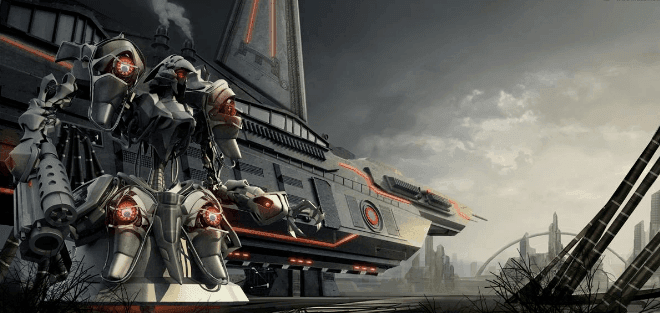
Your powerful CPU & GPU cloud rendering services and TPN-Accredited cloud render farm, Fox Renderfarm still shares with you the 3ds Max tutorial. In this tutorial, I conceived a sci-fi style scene, and named it "Fortress".
Introduction
Before I started production, I just made a preliminary idea. Because I didn't have too much time to create, I didn't draw a conceptual drawing. I just made a model while conceiving, so it took some time for the model to determine the final form. In the end, I rearranged it before finally making all the models.


The first thing I made was the head model of the robot. This model refers to the works of other artists. I defined the function of this robot as combat, so I changed its right hand to a firearm. The left and right are changed to claws according to the need to grasp things. In order to highlight the bright spots on the body, several red lights have been added.


After the building behind the robot is made, the composition problem needs to be considered. I prefer the wide composition. Originally, I didn't plan to place a spaceship behind the robot but made a large-scale crawler machine that walks on the ground.

However, I tried placing the composition in the lens, and after several attempts, I was not satisfied with the result. Later I thought of another method. I drew a diagonal line from the upper left corner to the lower right corner of the screen. The triangle in the upper right corner of the screen would be empty, and the composition on the left would be very crowded and the scene elements would appear impenetrable. So I referred to a conceptual drawing drawn by Mr. Sebastien Larroude, removed the track of the second main body, and added a sail to turn it into a spaceship. In this way, the composition in the camera becomes a stable triangle.


Lighting
After the composition is determined, it is the lighting work. In this project, I use the V-ray renderer for lighting and rendering. V-ray is very easy to use and can save money. I think it is very suitable for this project.
The main light source I use is the V-Ray sun in the V-ray rendering plug-in. The V-Ray sun can simulate the real sunlight effect. At the same time, I use the V-Rsky texture lighting method here and use the dome to simulate the skylight and form a more realistic shadow. They are the different effects produced by ordinary spotlights and V-Ray light.
The parameters of VRaySun are very simple. What needs attention is the light intensity. It is recommended to use VRayPhysicalCamera when using VRay Sun. If you use MaxCamera, it is best to change the Intensity multiplier to a small value. The size of the size multiplier area reflects the intensity of the sun's direct illumination range. The smaller the value, the smaller the straight-line light shadow range. On the contrary, the larger the shadow range, its the numerical unit is set according to the scene size.
The parameters of the V-Ray Sun are as follows.

The most important part of lighting is that the colors of the cold light source and the warm light source complement each other. For example, when making some relatively large scenes, the foreground and the background need to be separated, and the more we separate, the stronger the sense of perspective. A reasonable main light source will be the key to success. So in this step, we need to repeatedly test the rendering results.


Now please follow the best CPU & GPU cloud rendering service and TPN-Accredited render farm to our next part: 3ds Max Tutorials: Making a Sci-fi Scene in 3ds Max (2).