Blender
 Cinema 4D
 Arnold
 3ds Max
 Houdini
 V-Ray
V-Ray Maya
Maya Unreal Engine
 Nuke
Nuke3ds Max Tutorials: Making a Sci-fi Scene in 3ds Max (2)

Continue the 3ds Max Tutorials: Making a Sci-fi Scene in 3ds Max (1), the fastest GPU and CPU cloud rendering services provider and TPN-Accredited render farm, Fox Renderfarm still share with you the part of texturing and rendering in making a Sci-fi scene.
Texturing
Making textures is the most interesting part of the work, but realistic textures are also the most difficult to make. Understanding the texture we want to make is the first thing to do. The more common items in life, the more troublesome it is to make. So it is very important to find a reasonable reference.
For this project, I used the V-Ray shader to set the material. First of all, I chose the V-Ray Mtl material type, paying attention to the highlight setting.
For the metal material setting, first, add a texture to the diffuse, reflect the falloff to simulate Fresnel, and fine-tune the color in the curve and falloff parameters.

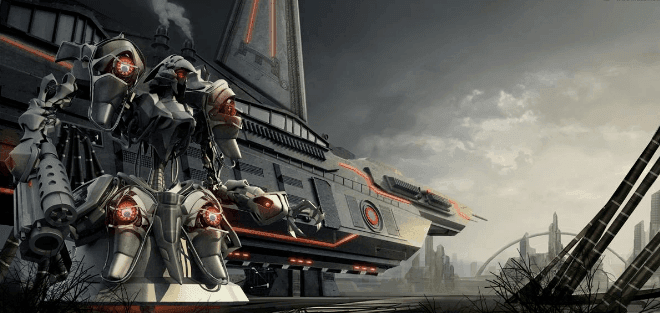
Because of the difference in metal texture, the robot's metal texture drawing has been slightly adjusted. For example, the metal texture of this robot is divided into three types, and their highlights will be somewhat different. I have used the Reflect glossiness adjustment in V-Ray Mtl.
Rendering
When the model, textures, and lights are all made, we can start rendering. As a 3D artist, rendering time is an issue that cannot be ignored. The rendering of this project uses layered rendering, which facilitates the post-processing of files and also speeds up rendering time, but the downside is that the lighting is not well controlled. If the lighting is adjusted, many files need to be re-rendered.


As for the production of CG scenes, it is crucial to the tone and atmosphere of the whole scene. Whether we can grasp the overall picture feeling is the key to the success or failure of creating CG scenes. The atmosphere can be created by adding special effects such as atmosphere, and the adjustment of the overall color of the picture is often achieved through color correction. There are two commonly used color correction methods, one is to directly color correct in 3ds Max, and the other is to color correct in PHOTOSHOP. I personally prefer to use PHOTOSHOP.

After the 3ds Max rendering work is completed, it is now the work of entering PHOTOSHOP, we need to further add details to the picture.


I adjusted the color, brightness, saturation, etc. to make the picture look more comfortable. Next, add details to the picture, including weeds, smoke, light-emitting energy bars, etc. I made a variety of attempts but finally chose red.


The final adjustment was the background. I wanted to add a distant city to the background, so I used 3ds Max to build a simple background city, then rendered it into PHOTOSHOP, and directly found some image materials to superimpose on it. The next step is to add a distant city to the screen. Because it is a faraway view, the city can quickly create a few boxes in Max, and then roughly render it, import it into PHOTOSHOP, and find the material to be directly superimposed on it. This saves the time to show the UV texture.

Finally, I want to add some clouds to the sky to make it look more natural. I used a brush to paint the clouds in PHOTOSHOP.


Fox Renderfarm hopes it will be of some help to you. As you know, Fox Renderfarm is an excellent cloud rendering farm in the CG world, so if you need to find a render farm, why not try Fox Renderfarm, which is offering a free $25 trial for new users? Thanks for reading!