 Blender
 Cinema 4D
 Arnold
 3ds Max
 Houdini
 V-Ray
V-Ray Maya
Maya Unreal Engine
 Nuke
Nuke


I think Fox is a good option for 3D artists like me who work with one computer for rendering videos with the best quality and be able to keep working on other things.

Jesús Gómez San EmeterioInteractive Designer

Speed up Unreal Engine projects with Fox Renderfarm.
Powerful GPU nodes, batch rendering, and secure cloud rendering workflow.


Fox Renderfarm uses thousands of nodes to render Unreal Engine projects quickly. You can pick CPU or GPU depending on the project. Rendering quality matches what you get on a local machine.
Fox Renderfarm supports MRQ and MSC modes for efficient distributed tasks. Level rendering is available to prevent visual effects from being lost during processing.
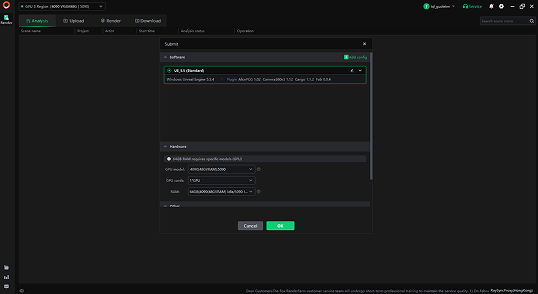
Fox Renderfarm supports multi-frame rendering on a single machine. This reduces repeated scene loading and shortens total render time, especially for large Unreal Engine sequences. You can also modify resolution before submission, making it easier to adjust output settings without reopening the project.
You can view the rendering interface directly on the node machine during processing. This helps monitor task status in real time. Timeout alerts and manual halting options are available to prevent unexpected resource usage and control overall rendering costs.

Fox Renderfarm operates as a TPN-accredited vendor and follows ISO/IEC 27001 standards to protect sensitive production files. NDA agreements are available for confidential collaborations.
UE project data remains protected throughout upload, rendering, and download. Files are transferred through an encrypted proprietary protocol and processed in isolated rendering environments.

Fox Renderfarm is built to handle demanding Unreal Engine projects and has supported large-scale film, television, and commercial productions. It has experience working with professional studios and complex rendering pipelines.
Fox Renderfarm provides a $25 free trial for new users to test the service. For a better user experience, 24/7 customer and technical support is always available. Failed frames are not charged, helping ensure transparent rendering cost.
Sign up and receive $25 render coupons for testing.
Submit your UE projects to Fox Renderfarm.
Fox Renderfarm automatically analyzes and renders your projects.
Preview and download the rendered files with just a few clicks.






Yes. Fox Renderfarm supports Unreal Engine 5 rendering workflows, including projects that use Lumen, Nanite, and the Path Tracer. Rendering output is generated based on your project settings to match local results.
Yes. Fox Renderfarm can process large scenes with high-resolution textures and cinematic lighting in the cloud. This helps reduce local hardware limitations when rendering architectural or commercial visualization work.
Fox Renderfarm supports common Unreal Engine plugins. If a project uses custom or third-party plugins, compatibility can be confirmed before submission.
Yes. MRQ presets configured in your Unreal project can be used during cloud rendering. Output settings follow your saved configuration.
Rendered results can be exported as image sequences such as PNG or EXR. Video formats are also supported depending on your project settings.
No. You only need to prepare and upload the project. The rendering process runs on Fox Renderfarm’s cloud servers.


