
 Blender
 Cinema 4D
 Arnold
 3ds Max
 Houdini
 V-Ray
V-Ray Maya
Maya Unreal Engine
 Nuke
NukeCinema 4D vs Blender: Is Cinema 4D Better Than Blender?

For artists, designers, and animators, selecting the best 3D rendering software can be difficult, especially when faced with two professional options: Cinema 4D and Blender. Both are strong tools with distinctive features and capabilities, making them popular choices for both novices and experts.
So, which one truly deserves your time and creativity? We've put Cinema 4D and Blender to the test, analyzing the critical differences to help you make an informed decision between Cinema 4D vs Blender.
Cinema 4D vs Blender: Overview Introduction
What is Cinema 4D?

Cinema 4D is a powerful 3D modeling, animation, and rendering software developed by Maxon. It is extensively utilised in fields including architectural rendering, product visualisation, and motion graphics, allowing users to create complex 3D objects with ease.
What is Blender?

Blender is an open-source and free 3D rendering product. From modelling and sculpting to animation and rendering, its feature set is remarkable. Because of its affordability and adaptability, Blender is well-liked by independent artists, enthusiasts, and even some professionals in the field.
1. Usability and User Interface
Usability is the first factor to take into account in the "Cinema 4D vs. Blender" argument.
Cinema 4D
Cinema 4D is known for its intuitive interface, making it accessible for beginners while still offering advanced tools for professionals. Tools and menus are grouped in a logical manner that is consistent with the creative process. C4D also allows you to customize their workspace by docking and arranging palettes (like the Object Manager, Attribute Manager, and Material Manager) to fit their specific project needs. Overall, C4D is user-centric and easy to learn, making it suitable for newcomers and those who prefer clean interface.
Blender
Blender's usability and user interface present a mixed bag. Blender's interface is quite different from other software and can initially feel overwhelming, especially for beginners. The layout includes numerous panels, buttons, and options that may seem cluttered at first glance.
In practice, Blender is highly customizable: you can create your own hotkeys, pie menus, and workspace layouts. Blender also boasts an active community that provides a wealth of tutorials, forums, and documentation, helping newcomers overcome the initial hurdles of learning this 3D rendering software. Many users report a noticeable improvement in their workflow efficiency once they become accustomed to Blender's hotkeys and interface.
Winner: Cinema 4D for its user-friendly interface and accessibility.
2. Price and Availability
Cinema 4D
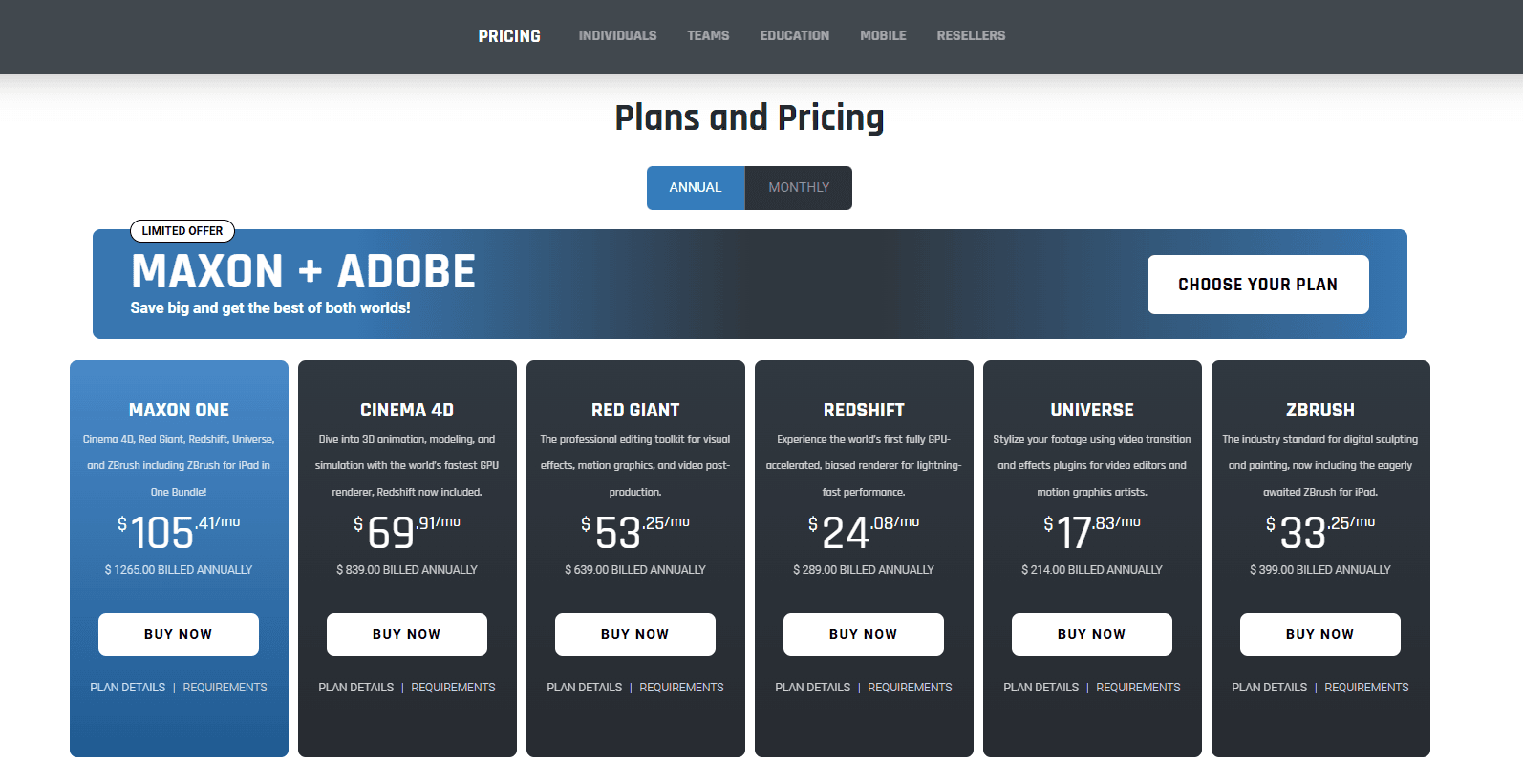
Cinema 4D has a subscription-based business model. Although this guarantees access to the most recent changes, the cost is high:
Monthly Subscription: around $109 per month.
Annual Subscription: about $839 per year – $69.91/mo.
Cinema 4D also offers corresponding educational discounts. If you are a student or teacher at an accredited university/school, or need the software for classroom use, Maxon provides an all-in-one rendering discount package. You can directly contact their sales team to learn about the specific plans.
The price is frequently justified for professionals and studios that depend on Cinema 4D's functionality and stability. However, the cost can be a deterrent for freelancers and enthusiasts.
Blender

Blender is open-source and totally free, so anyone can use it. You can download and use Blender without having to pay for it, regardless of your level of experience.
Winner: Blender for being widely available and reasonably priced.
3. Functionality and Features
Cinema 4D
Cinema 4D is well known for its powerful features, especially in the field of motion graphics. A feature of Cinema 4D, the MoGraph module makes it easier to create animations, effects, and procedural designs. Furthermore, Cinema 4D provides:
- Sophisticated rendering features, such as Redshift integration.
- Tools for character animation and rigging.
- Smooth interaction with Adobe After Effects and other programs.
Blender
Blender's feature set is comparable to that of software that costs money, providing:
- Tools for texturing, modelling, and sculpting.
- Sophisticated possibilities for simulation and animation.
- An integrated video editor and compositor.
- Eevee for real-time rendering and Cycles for excellent results.
- Despite Blender's great adaptability, some experts contend that using its capabilities to get the same effects as Cinema 4D takes more work.
Winner: Tie: Blender excels in adaptability, while Cinema 4D leads in motion graphics.
4. Rendering Features
Cinema 4D
The native render engine utilized by Cinema 4D includes sophisticated features like ambient occlusion and global illumination. It is perfect for high-quality projects because of its connection with Redshift, which provides unmatched GPU-accelerated rendering speeds.
Blender
Eevee and Cycles, Blender's render engines, serve distinct purposes. Cycles produces photorealistic effects, whereas Eevee renders in real time, making it ideal for previews and animations. Rendering in Cycles can be sluggish without high-end hardware, despite its power.
Winner: Cinema 4D due to its ability to render at a professional level.
5. Industry Applications
Cinema 4D
Cinema 4D is a mainstay in motion graphics, architecture, and advertising, and its integration with Adobe products makes it essential for professionals in broadcast design and animation. Studios frequently rely on Cinema 4D because of its dependability and smooth workflows. It is also used in multiple high-end VFX projects.
Blender
Blender is gaining popularity in the film industry, with projects like "Next Gen" demonstrating its capabilities. Blender is catching up, but Cinema 4D has established industry dominance due to its feature set and affordability. Although Blender is increasingly being adopted for more film projects, its industry standing is still not as established as commercial software like Cinema 4D in some large production companies. However, Blender is relatively widely used among independent creators and small to medium-sized studios.
Winner: Cinema 4D for established industry dominance, though Blender is catching up.
6. Personalisation and Add-ons
Cinema 4D
A large number of plugins are supported by Cinema 4D, which improves its performance for specific jobs. Cinema 4D is incredibly customisable thanks to the smooth integration of tools like X-Particles, Forester, and TurbulenceFD.
If you're interested in more information about Cinema 4D plugins, check out 15 Essential Cinema 4D Plugins.
Blender
Since Blender is open-source, customisation possibilities are unmatched. To meet particular requirements, developers can alter the program or write original scripts. Blender's capabilities are further enhanced by the expanding collection of add-ons, both free and paid.
If you're interested in more information about Blender plugins, check out Best Plugins and Add-ons for Blender in 2025.
Winner: Blender wins for versatility, even if Cinema 4D has excellent third-party plugins.
7. Support and Community
Cinema 4D
Users of Cinema 4D gain from Maxon's committed assistance, which includes forums, tutorials, and a helpful customer support staff. Users can successfully troubleshoot thanks to its well-documented features.
Blender
Blender has a sizable community on the internet. Users may discover answers to almost any issue, from in-depth forums to YouTube lessons. With increased funding for the Blender Foundation and more companies supporting Blender's development and use, its professional support is also continuously improving. However, in contrast to Cinema 4D, professional support is scarce.
Winner: Tie: Blender thrives on community-driven resources, whilst Cinema 4D provides expert assistance.
To Conclude?
After exploring the intricacies of Cinema 4D vs Blender, the answer to our central question isn't a simple "yes" or "no." The truth is, there is no single winner; there is only the best 3D rendering software for you.
- If you are a freelance creator or a small studio with a limited budget, or if you are involved in independent game development, animation, and VFX projects, Blender is recommended.
- If you want to get started quickly and use it for advertising, film, and motion graphics, and are willing to pay for the software, then Cinema 4D is the choice.
No matter whether you choose Cinema 4D or Blender, you may face a common challenge: lengthy rendering times. Although these 3D software come with built-in rendering tools, it's undeniable that due to the limited functionality of these built-in rendering services, the rendering process can take a very long time.
This is where a cloud render farm becomes an indispensable partner in your workflow. Instead of waiting hours or days, you can distribute your frames across thousands of high-performance servers simultaneously, cutting render times from days to minutes.
For creators using both Cinema 4D and Blender, we recommend FoxRenderFarm, a professional online rendering service. It natively supports both Cinema 4D (with Redshift, Octane, Arnold) and Blender (with Cycles and Eevee). All you need to do is upload your project to the website, and the system will automatically analyze and render it. Fox Renderfarm now also offers a $25 free rendering coupon for new users—don't miss out!