 Blender
 Cinema 4D
 Arnold
 3ds Max
 Houdini
 V-Ray
V-Ray Maya
Maya Unreal Engine
 Nuke
NukeBest Render Engine for Houdini: Technical Comparison
 Ryan Thompson
The best render engine for Houdini is rarely the one with the most impressive demo reel. The choice affects how scenes are shaded, how much memory they require, how well they fit Solaris, and how easily they can move from a workstation to a render farm.
This guide compares the technical factors that change a Houdini production: shader compatibility, CPU and GPU behavior, USD and MaterialX support, memory and out-of-core handling, licensing, and farm deployment.
Houdini Render Engines: Decision at a Glance
|
Renderer |
Best Use |
Compute |
Solaris / USD |
Shader Reality |
Memory Consideration |
License Position |
Main Limitation |
|
Karma CPU |
Native Houdini production |
CPU |
Native |
MaterialX and VEX-based workflows |
Uses system RAM |
Bundled with Houdini licenses; extra Karma licenses listed by SideFX at $195/year |
Slower than GPU-first renderers for some workloads |
|
Karma XPU |
Solaris look development |
CPU + GPU |
Native |
MaterialX, USD Preview Surface, and Karma-specific nodes |
GPU memory is important |
Included with eligible Houdini licenses; extra licenses may apply |
Does not support general VEX shaders |
|
Mantra |
Legacy Houdini scenes |
CPU |
Houdini-native |
Mature VEX workflow |
Uses system RAM |
Depends on Houdini licensing |
Slow for many modern final-render workloads |
|
Redshift |
Fast GPU rendering |
GPU |
Supported, but requires Redshift USD materials |
Redshift shader system and RS USD Material Builder |
Out-of-core support for supported data, but slower than fitting in VRAM |
Maxon subscription or commercial plan |
GPU memory and version compatibility |
|
Arnold |
Cinematic VFX |
CPU/GPU |
Supported through Houdini integrations |
Arnold shader workflow |
CPU provides large-memory flexibility; GPU has feature limits |
Autodesk subscription |
GPU and CPU feature parity is not identical |
|
V-Ray |
Cross-DCC production |
CPU/GPU |
Supported through V-Ray Solaris tools |
V-Ray materials and USD workflows |
Depends on CPU/GPU mode |
Chaos subscription and education plans |
More complex to standardize across a pipeline |
|
RenderMan |
Feature animation and VFX |
CPU/GPU/XPU workflows |
Strong USD orientation |
RenderMan shading workflow |
Pipeline and cache planning required |
Commercial licensing; non-commercial terms vary |
Higher setup and learning cost |
|
OctaneRender |
GPU look development |
GPU |
Houdini integration available |
Octane shader system |
Out-of-core textures are supported, but not a replacement for sufficient VRAM |
OTOY subscription or license plans |
Strongly dependent on GPU hardware |
Karma CPU and Karma XPU
Karma is Houdini's native physically based renderer and the most direct choice for Solaris. It is not simply another renderer plugin. Karma is designed around Houdini's USD workflow, including scene composition, lighting, materials, render settings, and Hydra-based viewport interaction.
Karma CPU
Karma CPU supports MaterialX and legacy VEX-based shaders. That makes it the more compatible choice for projects that still depend on Houdini's traditional shader networks.
It is particularly useful when a scene contains large caches, complex volumes, or assets that are too large for available GPU memory. The trade-off is straightforward: CPU rendering can be more tolerant of memory-heavy scenes, but it may take longer to produce interactive previews and final frames than a well-optimized GPU renderer.
Karma XPU
Karma XPU is designed to use the CPU and GPU together, but its shader compatibility is deliberately narrower. SideFX documentation states that XPU supports USD Preview Surface, MaterialX, and Karma-specific VOP nodes. General VEX-based shaders are not supported.
That limitation matters during pipeline migration. A Mantra or Karma CPU scene may render correctly with VEX patterns, custom VOPs, or legacy shader nodes, then require substantial material rebuilding before it can run in Karma XPU.

Karma CPU is the compatibility option. Karma XPU is the acceleration option for MaterialX-based workflows.
Karma XPU is a strong choice for new Solaris projects that are already built around MaterialX. It is a poor drop-in replacement for a mature VEX-heavy pipeline.
SideFX currently describes Karma licenses as bundled with Houdini Core and FX, with additional Karma licenses listed at $195 USD per year. Houdini Indie, Education, and Apprentice licensing has separate terms.
Redshift for Houdini
Redshift is usually the first renderer to evaluate when the main requirement is fast GPU rendering.
It is well suited to procedural motion graphics, instancing, particles, repeated geometry, and look-development workflows where artists need to see lighting and material changes quickly. Redshift's performance advantage is most useful when the scene fits comfortably in GPU memory and the shader network is built for Redshift rather than translated at the last minute.
Redshift in Solaris
Redshift supports Solaris, but the material workflow has a detail that is easy to miss.
According to Maxon's Houdini documentation, the standard RS Material output is not compatible with Solaris. Solaris projects should use RS USD Material or an RS USD Material Builder. Maxon also documents a Collect VOP workflow that allows Karma and Redshift materials to coexist in a Solaris scene.
This means Redshift is not a completely frictionless alternative to Karma in USD projects. A team can use both renderers, but it needs a material strategy. If the scene is designed for Karma's MaterialX workflow, moving it to Redshift may require renderer-specific materials rather than a one-click conversion.

Redshift Out-of-Core Rendering
Redshift includes out-of-core support for supported data such as textures and geometry. When GPU memory is insufficient, Redshift can use system memory rather than failing immediately.
That does not mean VRAM is irrelevant. Out-of-core rendering transfers data through a slower memory path, so a scene that fits in VRAM will normally render more efficiently than one that constantly spills into system memory. Out-of-core is a production safety mechanism, not a substitute for adequate GPU memory.
Redshift is the best GPU render engine for Houdini when the project is built around fast iteration, the team has suitable GPUs, and the material workflow is already compatible with Redshift or Redshift USD materials.
Arnold for Houdini
Arnold is a production renderer from Autodesk and remains a strong choice for cinematic VFX, detailed environments, character work, and complex lighting.
Its value is less about winning every interactive speed test and more about predictable output. Arnold has a mature approach to physically based shading, sampling, volumes, and production rendering. This makes it attractive to studios that already use Arnold in Maya, 3ds Max, or other departments.
Arnold's CPU mode is useful for scenes that require substantial system memory. Arnold GPU can provide faster rendering on supported hardware, but CPU and GPU modes are not feature-identical. A pipeline that depends on a particular shader, volume feature, or utility node should check Autodesk's current GPU support documentation before switching modes.
Autodesk's public pricing is regional. For example, Autodesk's India listing showed an annual Arnold price of INR 27,140 and a monthly price of INR 3,540 when this article was researched. Prices differ by country, tax, account type, and subscription period.
Arnold is usually the better choice than Redshift when the project is primarily about cinematic lighting, complex materials, and established VFX practices rather than maximum GPU preview speed.
V-Ray for Houdini
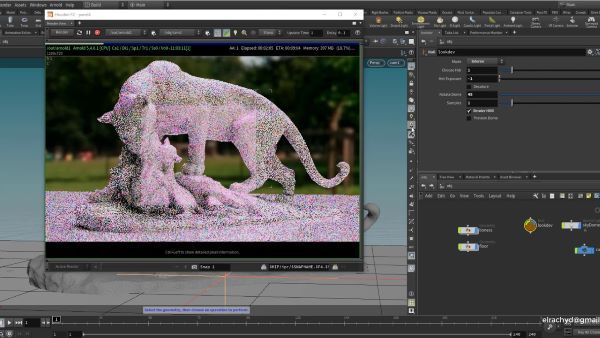
V-Ray is useful when Houdini is one part of a larger DCC pipeline.
The renderer supports Houdini alongside applications such as Maya, 3ds Max, Nuke, and Unreal Engine. This cross-application presence can reduce training and asset-conversion work for studios that already have V-Ray materials, lighting knowledge, and render management practices.
V-Ray supports both CPU and GPU rendering. The important production question is not simply whether both modes exist, but whether the features used by the project behave consistently between them. Studios should check their material nodes, volumes, displacement, hair, and compositing passes before standardizing on a single mode.
V-Ray is often the practical choice for teams that need Houdini to interoperate with architectural visualization, product visualization, or VFX pipelines built around other DCC tools.
RenderMan for Houdini
RenderMan is Pixar's production renderer and is designed for high-end animation and visual effects workflows.
Its strongest use case is not a quick personal test scene. RenderMan becomes more valuable when a studio needs structured shading, USD-based asset organization, predictable shot rendering, and a production pipeline that can be maintained over a long project.
The trade-off is setup cost. RenderMan may require more pipeline preparation and artist training than a simpler GPU renderer. For a feature animation or large VFX production, that investment can be justified. For a short motion graphics project, it may add unnecessary complexity.
Mantra, OctaneRender, and 3Delight
Mantra remains relevant for existing Houdini scenes, especially projects built around VEX shaders and established procedural workflows. Its main weakness is render time, not image quality. New projects should compare its production cost against Karma CPU, Karma XPU, and third-party options.
OctaneRender is a GPU-focused renderer with out-of-core texture support. It can be effective for interactive look development, but its performance is highly dependent on GPU memory and shader compatibility.
3Delight is better understood as a specialized pipeline option than as the default Houdini renderer for every user. It may be valuable when a studio already has 3Delight knowledge, assets, or procedural shading tools.
Which Renderer Is Best for Specific Houdini Workflows?
Solaris and USD
Recommendation: Karma first, Redshift second.
Karma has the cleanest native relationship with Solaris. Redshift is viable, but Solaris materials should be built with Redshift USD materials rather than standard Redshift material outputs.
Pyro and VDB Volumes
Recommendation: Karma, Arnold, Redshift, or V-Ray depending on the scene.
The important metrics are volume memory, scattering quality, motion blur, denoising, and render-farm support. A renderer that is fast on a solid object may not be fast on a dense Pyro cache.
Procedural Instancing and Motion Graphics
Recommendation: Redshift.
GPU acceleration and efficient handling of repeated geometry can make Redshift particularly effective for procedural motion graphics. Karma XPU is worth considering when the same project already uses Solaris and MaterialX.
Legacy VEX-Heavy Projects
Recommendation: Karma CPU or Mantra.
Karma XPU is not a drop-in solution for VEX-based shaders. If the project depends on custom VOPs, legacy materials, or VEX-driven patterns, Karma CPU may require less rework.
Cross-DCC Studio Pipelines
Recommendation: V-Ray or Arnold.
The best renderer is often the one already used by the studio's other applications. Shared materials, lighting practices, and render management can save more time than a small difference in single-frame speed.
How to Benchmark Houdini Render Engines Properly
A useful comparison needs more than one beauty render. Use three representative test scenes: a Solaris asset with MaterialX materials and several lights, a Pyro or VDB scene with motion blur and volume scattering, and a procedural scene with heavy instancing, packed primitives, and large textures.
Render the same frame range at the same resolution and use equivalent quality targets. Record median wall-clock time over three runs, peak VRAM, peak system RAM, failed frames, output noise, and the amount of manual shader conversion required.
The final metric should be cost per approved frame, not just seconds per frame. A renderer that is 20% faster but requires a new license for every render node may be more expensive for a large animation.
Houdini Cloud Render Farm: When Local Hardware Is Not Enough
Renderer selection and render capacity are separate decisions.
A fast renderer does not solve a project that exceeds local GPU memory, requires thousands of frames, or keeps the artist's workstation occupied for several days. This is where a Houdini cloud render farm becomes relevant.
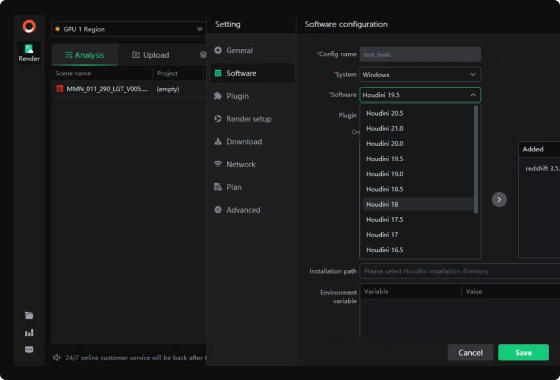
Fox Renderfarm, a professional Houdini render farm, supports CPU and GPU rendering for Houdini projects, including large simulations, high-resolution frames, plugin-based submission, and production pipelines that need additional compute capacity.
The service is not a replacement for Karma, Redshift, Arnold, or V-Ray. It provides the machines that run the selected renderer. Before submitting a complete sequence, the production team should verify the Houdini version, renderer version, plugins, texture paths, caches, licenses, and frame dependencies.
A small test range is especially important for Houdini simulations. If a cache, digital asset, or renderer-specific shader is missing, the problem can affect every frame in the job.
Fox Renderfarm also provides a broader cloud rendering service for teams that need temporary CPU or GPU capacity without purchasing permanent hardware. The Houdini client submission guide explains the practical submission workflow.
Conclusion
For most new Solaris projects, choose Karma. For fast GPU iteration, choose Redshift. For cinematic VFX and complex lighting, choose Arnold. For cross-DCC production, choose V-Ray. For structured feature animation and high-end USD pipelines, consider RenderMan.
The most important technical distinction is between compatibility and acceleration. Karma CPU supports a broader Houdini shader workflow, while Karma XPU is faster only after the project is built around MaterialX and supported XPU nodes. Redshift can provide excellent GPU performance, but Solaris projects must use Redshift USD materials and should treat out-of-core rendering as a fallback rather than unlimited memory.
Once the renderer is selected, a cloud render farm can provide the additional CPU or GPU capacity required to turn a workable Houdini scene into a deliverable sequence.
FAQs
What Is the Best Render Engine for Houdini?
Karma is the best general starting point for Solaris and USD. Redshift is usually the strongest GPU-focused option, Arnold is well suited to cinematic VFX, and V-Ray is practical for cross-DCC pipelines.
Is Karma XPU Faster Than Redshift?
There is no universal result. Redshift often has an advantage in GPU-focused workflows, while Karma XPU is more attractive when the project is already built around Solaris, USD, and MaterialX.
Does Karma XPU Support VEX Shaders?
No. Karma XPU supports USD Preview Surface, MaterialX, and Karma-specific VOP nodes. General VEX-based shaders are not supported, so VEX-heavy projects may require material conversion before using XPU.
Does Redshift Work With Houdini Solaris?
Yes, but Solaris requires the Redshift USD material workflow. Maxon's documentation states that the standard RS Material output is not compatible with Solaris; use RS USD Material or RS USD Material Builder instead.
Which Houdini Renderer Is Best for GPU Rendering?
Redshift is usually the first option to evaluate for GPU-focused Houdini rendering. Karma XPU is a strong alternative for MaterialX-based Solaris projects, while OctaneRender is another GPU-oriented option.
Does Redshift Support Out-of-Core Rendering?
Yes. Redshift supports out-of-core rendering for supported data such as textures and geometry. It can use system memory when GPU memory is insufficient, but performance is generally better when the scene fits in VRAM.
How Much Does Karma Cost?
SideFX currently lists additional Karma licenses at $195 USD per year. Karma licensing is also bundled with certain Houdini licenses. Check SideFX's current licensing page because terms vary by Houdini edition and can change.
Can Houdini Render on a Cloud Render Farm?
Yes. Houdini projects can be rendered on cloud infrastructure when the required Houdini version, renderer, plugins, caches, assets, and licenses are supported. A small test submission should be completed before sending the full frame range.