
 Blender
 Cinema 4D
 Arnold
 3ds Max
 Houdini
 V-Ray
 Maya
 Unreal Engine
 Nuke
 Pricing
 New User Bonus
 Cost Estimator
 Christmas Sale


Install 3D plugins
The plugin adds a Fox Renderfarm entry to the menu bar of your 3D application, so you can submit a render job without leaving the software. It handles analysis and submission only; the frames render on the farm, not inside your 3D application.
Notes
- The plugin is installed automatically with the desktop client — there is nothing separate to download.
- Supported applications are 3ds Max, Maya, Cinema 4D and Blender. On Linux, only the Maya plugin is available; the other three are Windows-only.
- The client has to be running and signed in for the menu entry to appear.
- Once a job is on the farm, follow its progress and download the results in the client or the web console, not in the 3D application.
Install
1、Install the desktop client that matches your operating system — the plugin is installed along with it (see Install the desktop client).
2、Start the client and sign in with your website account.
3、Open your 3D application and look for Fox Renderfarm in the menu bar. If the entry is there, the plugin is installed. If it is not, the plugin was not installed automatically — follow the steps in If Fox Renderfarm is missing from the menu below to install it manually.
Submitting a job is described in the Software guides page for your application.
If Fox Renderfarm is missing from the menu
1、Open the Plugins page in the client's left sidebar.
2、Find the plugin for your application in the list and install it.
3、Restart the 3D application and check the menu bar again.
4、If it is still missing, contact online support with the name and version of your 3D application.
Uninstall
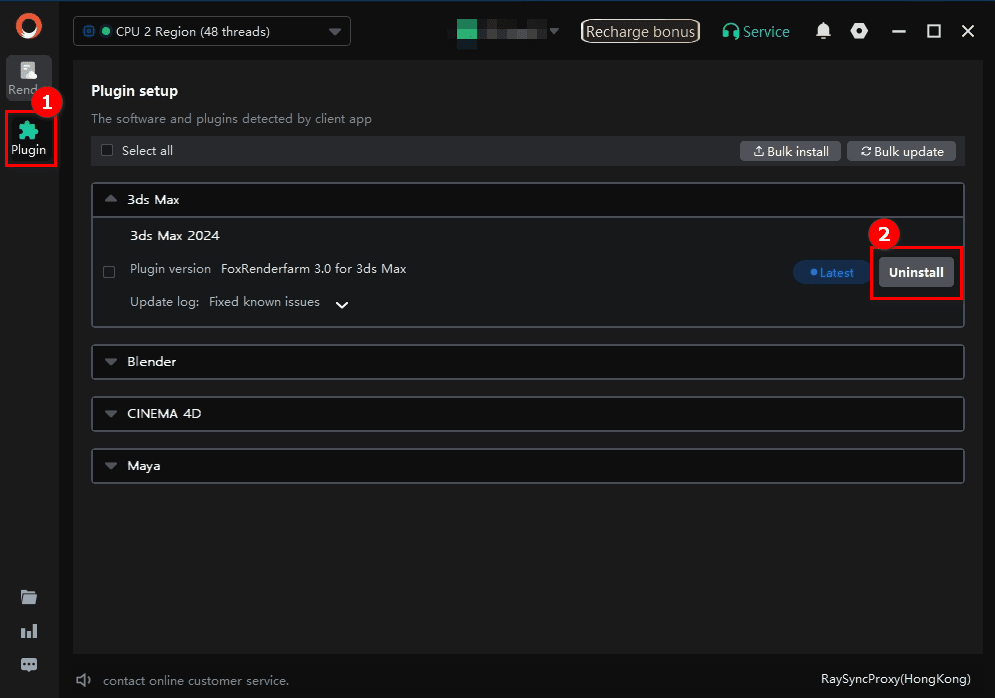
1、Open Plugins in the client.
2、Select the plugin version and click Uninstall.
FAQ
Do I need to download the plugin separately?
No. It is installed with the desktop client.
Which applications are supported?
3ds Max, Maya, Cinema 4D and Blender. On Linux, only the Maya plugin is available; the other three are Windows-only.
The menu entry disappeared after an update.
Open Plugins in the client, reinstall that plugin version, then restart the application.
Does the plugin render on my machine?
No. It analyses the scene and submits it; the frames render on the farm.
I uninstalled the plugin — is the menu entry gone?
Yes, after the 3D application restarts.


