
 Blender
 Cinema 4D
 Arnold
 3ds Max
 Houdini
 V-Ray
V-Ray Maya
Maya Unreal Engine
 Nuke
Nuke5 Best 3D Modeling Tools in 2026: From Beginners to Professionals
 Ryan Thompson
You are ready to build a dream 3D character or game environment, but your old software keeps lagging and crashing. It is frustrating when your creative ideas are stuck behind a slow, complicated interface. However, it is now easier to produce wonders with the proper tools.
Whether you are just beginning or a professional artist, the best 3D modeling software is the key to success. Thus, this guide examines the top 3D modeling tools to help you find the perfect match for your skills.
Part 1. What Makes a Great 3D Modeling Software Today?
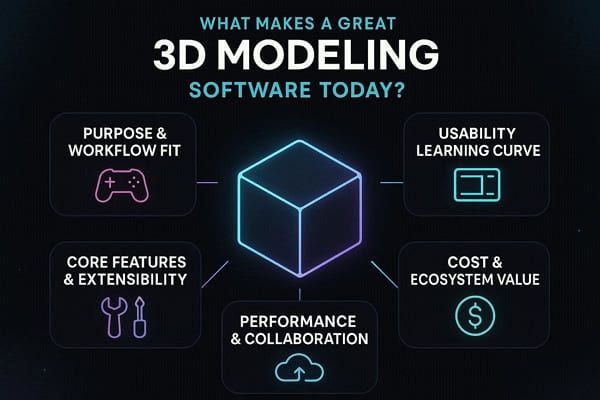
When choosing the ideal software for 3D modeling, know that the right option combines intuitive, often brush-based, sculpting with robust, parametric, non-destructive CAD workflows. Therefore, this section will highlight 5 key aspects to look for in the foremost 3D Software.
Purpose & Workflow Fit
3D software should effectively fit your workflow, e.g., games, CAD, VFX, or architecture. Moreover, make sure that it offers the appropriate tools, e.g., parametric modeling, BIM, or polygon workflows, for that particular use.
Usability and Learning Curve
The interface of the software must be clean and easy to use to allow the user to operate without any confusion. It must also strike a balance between tools that are easy to use by beginners and those that are complex enough to be used by professionals.
Core Features and Extensibility
It must have strong modeling capabilities such as polygon, sculpting, NURBS, and parametric systems. Moreover, select one that can render, simulate, have plugins, scripts, and can read and write several file formats.
Performance & Collaboration
The software of choice should be able to handle large and complicated scenes without choking or instability. Therefore, when selecting one, ensure that it has collaboration tools such as cloud sharing, version control, and team asset management.
Cost & Ecosystem Value
The price must be affordable to various users, such as free, subscription, or a one-time purchase. That is why it has to provide long-term value in updating, plugins, training, and adoption in the industry.
Part 2. 5 Best 3D Modeling Software in 2026
In 2026, the choice of the best program for 3D modeling depends on your needs. Blender is the top free, all-purpose tool; Autodesk 3ds Max and Maya excel in games and animation. This, along with other options, if you seek to know more, adhere to the details mentioned below to make the right choice:
1. Blender
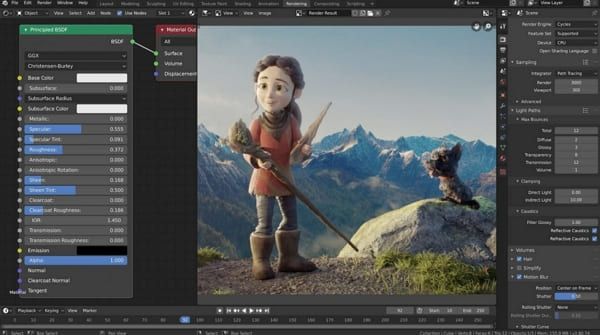
As a free and open-source 3D suite, this software includes polygonal modeling, B-meshes, Bézier curves, NURBS surfaces, and metaballs for creating a wide range of objects. Unlike other options, it enables users to change models at any stage without permanently altering the original geometry, such as a subdivision surface. It also features dynamic typology and various brushes for natural, detailed modeling.
Key Features
- Blender comes with a node-based system for procedural modeling and creating complex environments.
- Has Cycles for photorealistic path tracer rendering and Eevee for real-time rendering.
- Features a set of animation tools, armature rigging, shape keys, and non-linear animation editors.
Pros
- Grease Pencil allows 2D drawing and animation within a 3D space.
- Available for free download and customization.
Cons
- It may struggle with extremely dense meshes compared to specialized software.
- Being community-driven, it can be buggy and slower at times.
Pricing Plans
- Cost: Free ($0)
2. Autodesk Maya
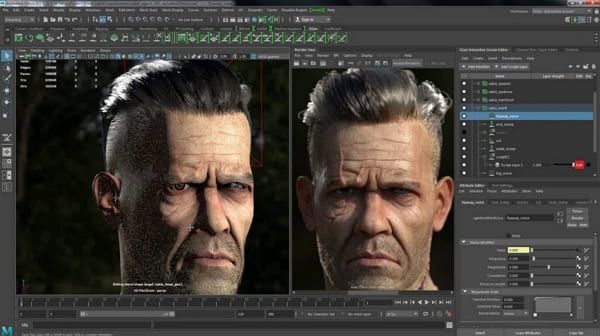
It's another of the best 3D modeling software programs that supports Smart Extrude with vertices, edges, and faces for polygon modeling. Furthermore, for NURBS modeling, it allows one to create mathematically precise surfaces and curves, ideal for organic shapes. Users can also leverage the sculpting toolset, which includes intuitive brush-based tools directly on 3D meshes.
Key Features
- Maya’s node-based architecture enables non-destructive modeling, allowing the modification or deletion of specific steps.
- Bifrost is a procedural framework for Maya that creates, simulates, and renders photorealistic effects like fire.
- Integrates OpenUSD to improve collaborative workflows, allowing teams to work simultaneously.
Pros
- Supports Python and MEL for automating tasks and building custom tools.
- Maya Fluid Effects enables realistic physics-based simulations.
Cons
- Maya is expensive, making it less accessible for individual artists.
- Surface modeling, kitbashing, and retopology require third-party plugins to be efficient.
Pricing Plans
- Free Trial: 30-day free trial available
- Monthly Subscription: $255/month
- Annual Subscription: Best value, approx. $168/month
- 3-Year Subscription: $6,025 (billed annually)
- Autodesk Flex: Pay-as-you-go, approx. $300 for 100 tokens (costs about 6 tokens/day)
3. Autodesk Fusion
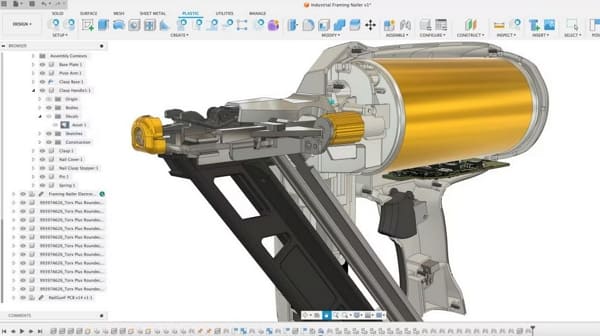
This is a cloud-based 3D modeling and 3D CAD software that is known for integrating parametric, surface, and mesh modeling in one package. In this regard, it includes tools such as T-spline freeform modeling, sheet metal design, comprehensive assemblies, and photorealistic rendering. For Parametric modeling, users can create history-based features such as extrude and revolve, which automatically update when dimensions are modified.
Key Features
- In Direct modeling, geometry is modified directly without editing intermediate stages.
- For free-form modeling, T-Splines are well-suited for sculpting organic shapes and for intuitive push-pull tools.
- Mesh modeling enables editing and repairing STL or OBJ mesh files from 3D scans.
Pros
- Supports top-down or bottom-up assembly design, including motion analysis.
- Enables real-time, team-based project sharing, version control, and commenting.
Cons
- Being cloud-based, it requires a stable internet connection to operate.
- Lack of robust, advanced simulation tools and sometimes unstable performance can be problematic.
Pricing Plans
- Autodesk Fusion for Manufacturing: $170/month, paid annually (1 Year)
- Autodesk Fusion for Design/Manufacturing: $183/month, paid annually
- Autodesk Fusion: $57/month, paid annually. $85, paid monthly
4. Rhino
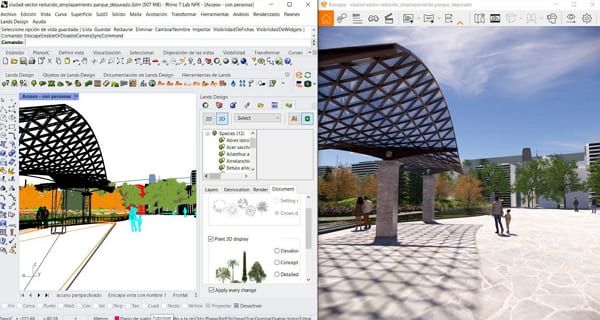
This 3D drawing program uses NURBS-based geometry to create, edit, analyze, and render complex free-form curves and solids without complex constraints. Moreover, for free-form and organic modeling, it includes Subdivision (SubD) tools, ideal for quickly creating smooth, organic shapes that are easy to edit. Featuring unmatched compatibility, it can also read and repair meshes and complex IGES files, with seamless integration into CAD, CAE, and animation pipelines.
Key Features
- Built-in parametric modeling tool enables complex, algorithmic design workflows without requiring deep coding skills.
- Features like the Gumball manipulator enable fast, intuitive, direct manipulation of objects.
- Advanced mesh manipulation to create, edit, and convert meshes into clean, quad-dominant surfaces.
Pros
- Grasshopper allows parametric design and generative algorithms.
- Supports a wide range of file formats, making it easy to exchange data with other designs.
Cons
- Modifying complex models requires rebuilding; historical feature management is less robust.
- Regarding NURBS-to-mesh conversion, users face issues exporting files to other software.
Pricing Plans
- Commercial License: Approximately $995
- Educational License (Students/Faculty): Approximately $195
- School Lab License (30-user): Around $975
5. Tinkercad
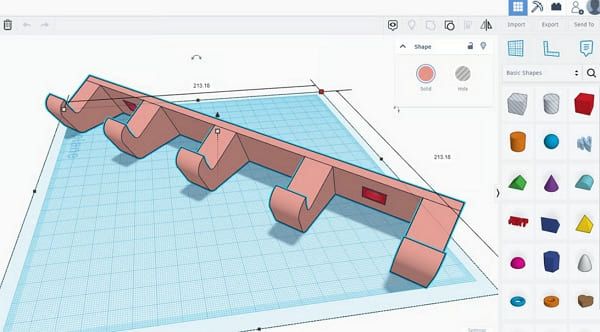
Tinkercad is another free, browser-based 3D modeling tool designed for beginners, offering intuitive drag-and-drop shape manipulation and constructive solid geometry features. One can also consider it a good 3D modeling software because it operates entirely in the cloud, requiring no installation, making it accessible on any computer. Additionally, in terms of Constructive Solid Geometry, users can combine basic shapes or use them to create holes for subtracting material.
Key Features
- Models can be exported directly in STL, OBJ, or SVG formats, optimized for 3D printing.
- Allows users to create parametric, dynamic, and animated 3D objects using visual, block-based programming.
- The Workplane Tool enables users to define a new, temporary workplane on any surface of an object.
Pros
- A unique, built-in circuit simulator combines 3D models with electronic components.
- Scribble Tool lets users draw 2D shapes, which are then converted into 3D models.
Cons
- Restricted to primitive shapes and constructive solid geometry, lacks parametric modeling features.
- Difficult to manage complex alignments and precise dimensions compared to CAD software.
Pricing Plans
- Cost: 100% Free
Part 3. From Modeling to Rendering: The Next Stage in 3D Production
As one chooses software to build 3D models, the next critical step is rendering, in which raw models are transformed into realistic images or animations. At this stage, lighting, textures, shadows, and camera angles are processed to create the final visual output. Rendering, however, can be highly demanding in terms of hardware and time, especially for complex scenes. This is where cloud rendering services like Fox Renderfarm come in, offering cloud-based rendering.
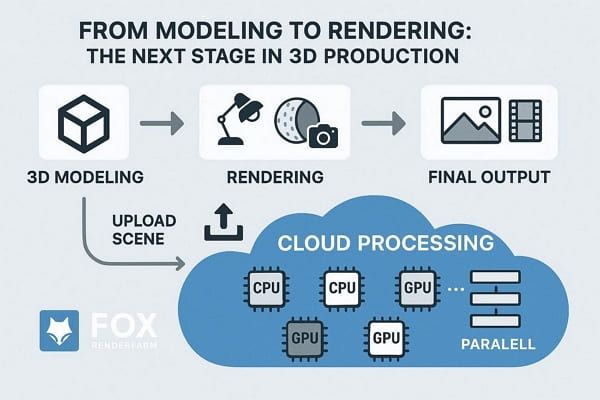
Using this, you upload the package to its desktop client (Raysync) or web platform, and it analyzes the scene. It splits your project into parts, processes them across multiple CPUs/GPUs simultaneously, and delivers the final images or animations quickly. Moreover, its high-performance SSD storage avoids the I/O bottlenecks in large scenes and caches. With automatic rendering cost calculation, you can estimate the budget impact, with no charges for failed tasks.
FAQs about 3D Modeling Tools
1. What is 3D modeling software used for?
3D modeling software helps you create digital objects for games, movies, architecture, and product design with ease. In addition, it lets you edit the shape textures and details to build realistic scenes in real time.
2. How long does it take to learn 3D modeling software?
You can learn basic tools in no time, but high-end software can take months or even years to master. Since it depends on time and effort, you can rely on Blender or Tinkercad as beginner-friendly options for building skills step by step.
3. What file formats do 3D modeling programs support?
Most 3D design programs support common formats such as STL, OBJ, FBX, and STEP to meet different project needs. The choice of format depends on whether the goal is 3D printing, game development, rendering, or engineering. Thus, these formats help share models across tools, so users can move files easily between different software and workflows.
4. Can I run 3D modeling software on a low-end PC?
Yes, you can run 3D software on a low-end PC by focusing on low-poly modeling. You can do so by using older software versions or leveraging browser-based tools for basic modeling and learning.
Conclusion
To sum up, having the right 3D modeling software can improve your workflow, boost creativity, and help you create high-quality 3D designs efficiently. Therefore, this guide has compared the 5 best options, including detailed aspects and pricing, to help you make the right choice. As you choose the best 3D modeling software, a render farm will help you render faster and more efficiently, especially for complex projects.


 Ryan Thompson
 Ryan Thompson
 Ryan Thompson