
 Blender
 Cinema 4D
 Arnold
 3ds Max
 Houdini
 V-Ray
V-Ray Maya
Maya Unreal Engine
 Nuke
Nuke9 Best 3D Rendering Software for Architects and Designers
 Ryan Thompson
Finding the right 3D rendering software is not always easy. Some tools are better for architecture, some are better for product design, and others are easier for beginners who want faster results without a steep learning curve.
In this guide, we compare 9 popular 3D rendering tools for architects and designers, including free and beginner-friendly options. You will get a quick sense of what each tool is best for, where it feels limited, and which one may fit your workflow better.
Quick Guide: 3D Rendering Software Comparison
1. TwinMotion: Best for architecture beginners and fast real-time visualization
2. Blender: Best fully free all-in-one option
3. KeyShot: Best for product and industrial design
4. Lumion: Best for fast architectural rendering
5. V-ray: Best for photorealistic interior and exterior rendering
6. Fox Renderfarm: Best for faster final rendering and large scenes
7. Corona: Best for easy archviz workflows
8. Octane Render: Best for GPU-based product rendering
9. Arnold: Best for high-end CG and production pipelines
1. TwinMotion: Beginner-Friendly and Fully Loaded
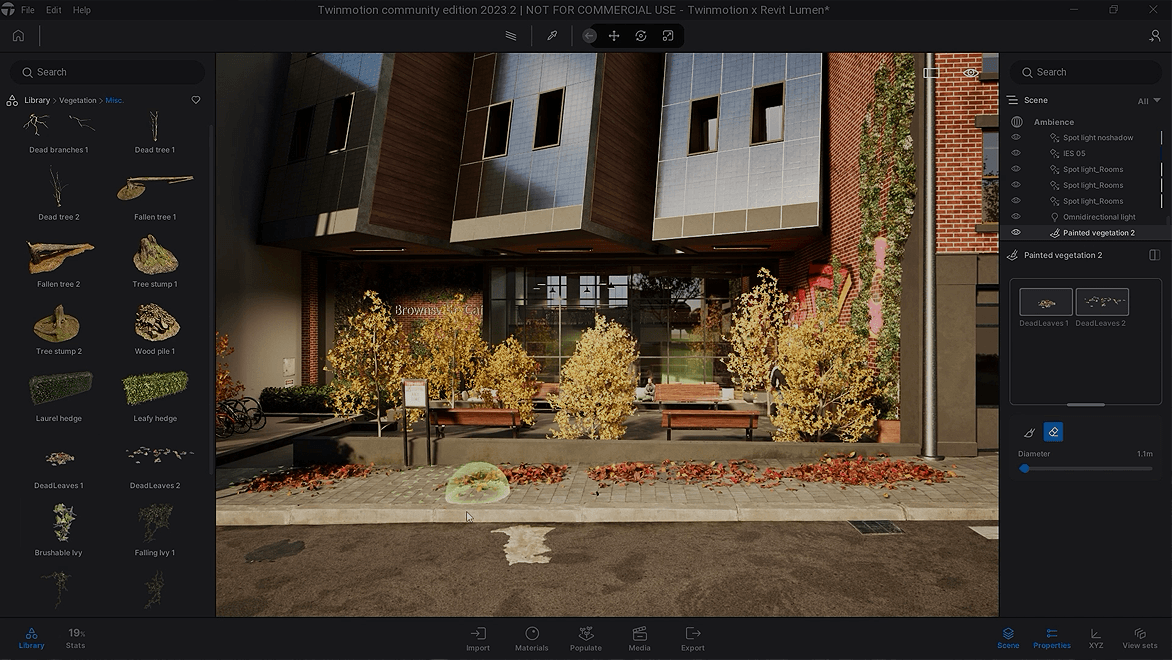
TwinMotion is a beginner-friendly real-time 3D rendering software for visualization. It offers essential environmental features like lighting, weather, props, and sky, making it ideal for beginners to better understand optimal scene arrangement, camera angles, and how lighting and weather impact the scene.
With its built-in extensive asset library, you can construct an ideal scene directly through drag-and-drop. Moreover, TwinMotion supports Nanite, helping you handle massive details without overloading memory, which is particularly advantageous for large-scale scenes.
Best of all, if you are a student, educator, hobbyists, individuals, or operating a small company (with annual revenue below $1M USD), you will be eligible to use TwinMotion for free.
What We Like
- User-friendly real-time visualization
- Provide community forums for learning
What We Don't Like
- Limited partial rendering capabilities on Mac (Path Tracer, VR)
- Bit hard to handle large scenes
2. Blender: Free and Open-Source

As a free and open-source tool, Blender is one of the most widely used options for both 3D modeling and rendering. With Cycles for photoreal output and Eevee for fast previews, it works well for architecture, animation, product visualization, and general 3D learning.
Best of all, Blender is for sure being 100% free out there. Equipped with 3D modeling and rendering features, Blender can help you model and render. It provides 2 render engines: Cycles, which delivers high-quality photorealistic results, and Eevee, designed for rapid previewing and real-time rendering. Therefore, Blender is widely utilized in architectural visualization, animation production, and simulation projects.
It enables incredibly lifelike images, such as global lighting and ray tracing. While it's complex for beginners, there are tons of resources and a robust community to get you back. This makes it a great option for users of all skill levels, especially new artists without a budget.
What We Like
- 100% Free to use
- Full features for modeling and rendering
What We Don't Like
- Steep learning curve
- Can be slow for high-quality rendering
Read more:
- Blender Architecture Render Techniques for Beginners and Pros
- How to Render Faster in Blender [Full Guide]
3. KeyShot: Best for Industrial Design

For industrial design, KeyShot is the industry standard. It stays ahead in terms of time/result. With an extensive library of scientifically accurate, physically-based materials, KeyShot captures everything from subtle textures and authentic metal finishes to complex transparencies and coatings with stunning precision. This elevates your designs to look very professional. The 3d design rendering software creates exceptional material realism and meticulous details for furniture, jewlry rendering, sculptures, and product design.
The only frustrating part is that it takes more time to render if lots of effects are added. And it has limited procedural materials and is different for interior and product design. Overall, it can still be the best rendering software to present 3D models and products.
What We Like
- Simple to use. Good for quick initial renders
- Large collection of materials
What We Don't Like
- Slow rendering
- Causal random crashes
- Limited procedural materials and lighting settings
4. Lumion: Top-notch Rendering Engine for Architects

Realistic and immersive visualizations are the main focus of Lumion, the best intuitive 3D rendering software for architecture. It makes realistic 3d renderings of the structures, and is easy to start making 3d, axonometries, and plan view renderings. Lumion has a ton of library of materials or models (human figure, trees, vehicles) that can be added to your building design project to make it eye-catching and more realistic.
Moreover, Lumion produces fast 3D large scene renderings with its integrated environmental assets, helping you quickly populate scenes with contextual elements like buildings and vegetation. It is a popular choice among architects, designers, and visualization professionals to bring their architectural exteriors and landscape designs to life and communicate their vision effectively.
Before using it to render your scenes, make sure you have a powerful computer. Since this is a high-power rendering engine, this software needs higher processing power. You need a good graphics card to get the best results.
What We Like
- Easy and quick rendering for large scenes
- A large collection of materials and models for architecture
What We Don't Like
- Take time for rendering very complex building designs
- Does not support Mac computers
5. V-ray: Perfect for Interior & Exterior Design

Different from Lumion, V-Ray is a 3D rendering plugin best for interior and exterior design. It is known for its high-quality photorealistic rendering capabilities like realistic textures and excellent lighting quality. That's why it is used in various industries such as architecture, design.
With the many lighting and material options that V-Ray provides, users may produce incredibly realistic and eye-catching effects. It has stunningly realistic lighting and shadows, offers a vast library of materials, and manages 3D large scenes quickly. V-Ray will be better for architecture notably, probably not for product rendering.
What We Like
- Compatible with popular 3D modeling and animation software
- Enhance realism in architectural visualizations and renders
What We Don't Like
- Hard to learn
- Require significant time for rendering
6. Fox Renderfarm: Best for Faster Final Rendering and Large Scenes
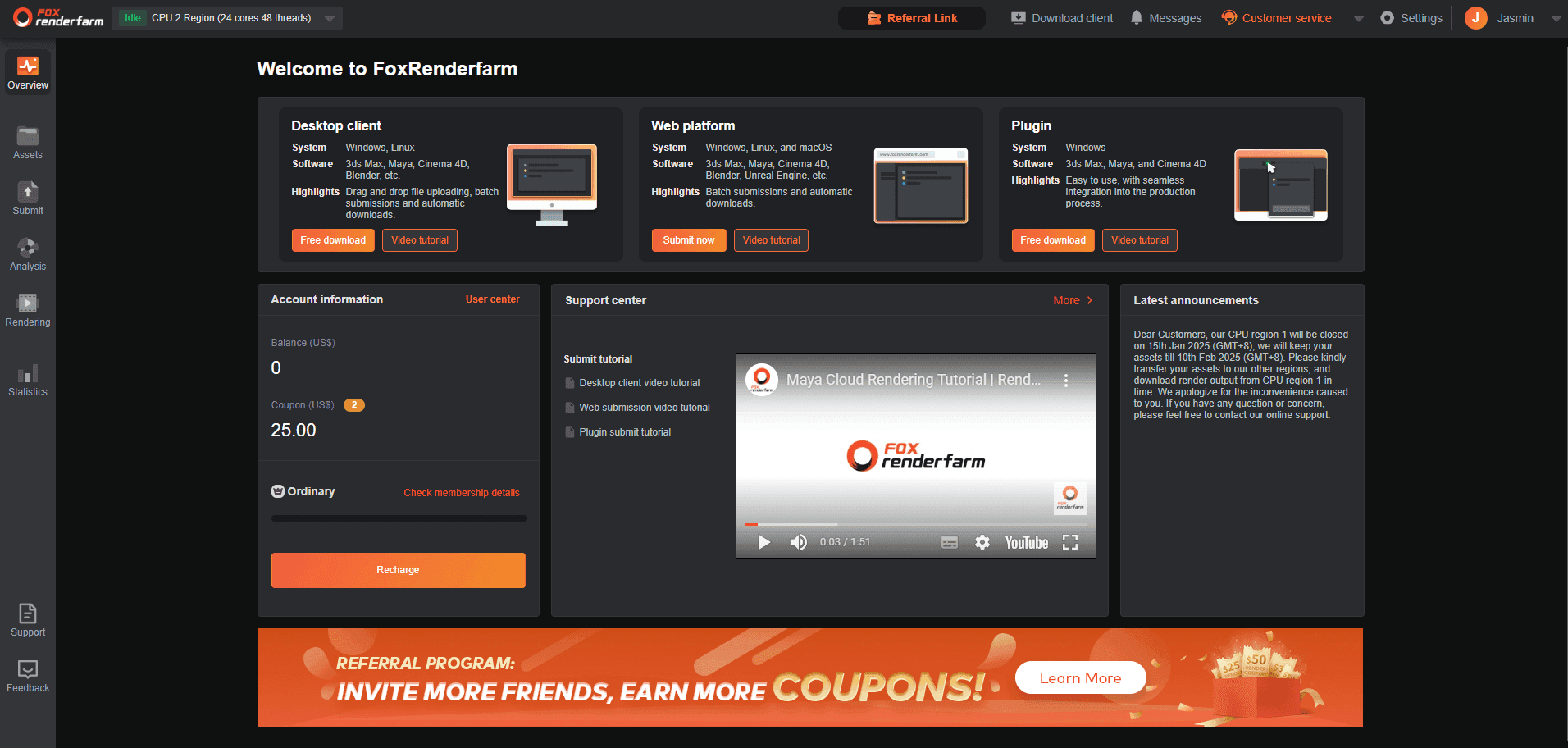
If your 3D rendering software is doing its job but your local machine is too slow, a render farm can be a more practical solution than upgrading hardware right away. Fox Renderfarm helps artists render large scenes, animation, and heavy projects more efficiently through remote CPU and GPU nodes.
A more efficient solution is to use a render farm like Fox Renderfarm. Instead of relying on your local machine, it processes rendering tasks on powerful remote CPU and GPU nodes, which helps reduce render time and improve stability. It supports major 3D software and formats, making it suitable for rendering large projects, complex scenes, and animation more smoothly.
New users can receive a $25 trial credit to test the service and experience the speed of cloud rendering.
Fox Renderfarm: Make 3D Rendering Fast and Easy
- Compatible with most 3D modeling software & plugins, including Blender, 3Ds Max, Maya, and more.
- Thousands of nodes - Process multiple tasks simultaneously at a lightning-fast speed.
- Enterprise-grade Security - Project files are automatically and permanently deleted from our servers after job completion.
- 24/4 Customer Support - Provide 24/7 live support and offer professional help anytime.
7. Corona: Used for House Design & Beginners

Corona is a highly regarded 3D rendering solution for realistic visuals. You can use it to create interior and exterior visualizations and its renders are realistic and of high quality. Another standout feature lies in its ease of use. For students or new designers, Corona can be a solid option. It is known for its simple interface and settings. New users can quickly get up to speed. The interactive rendering is fast and responsive, which makes it easy to test ideas quickly and iterate on visuals.
Since Corona is CPU-based, instead of GPU-based, the renders can take some time. It lacks built-in asset libraries. And some users complain that there is noise in Corona Renderer.
>> Read More: How to Reduce Noise in Corona Renderer
What We Like
- Easy to get to work with
- Photorealistic renders and stunning visuals
What We Don't Like
- Limited material library and 3D models
- Only for 3ds Max
- No real-time rendering
8. Octane Render: Best for Product Rendering

Enough about architecture rendering, next let's present you a very good program for product renderings - Octane Render. It has nice lighting, texturing, and shading. For designers and artists, this 3d product rendering software delivers exceptional visual fidelity. As a rendering engine that runs on a GPU, Octane Render is optimized to give results quickly.
Octane Render offers a free rendering version that is adequate for most users in addition to a paid version with more capabilities. Professionals in the field love it for its physically accurate lighting and real-time rendering capabilities. Since Octane Render easily interfaces with widely used 3D modeling tools, many designers and artists find it to be a useful option.
>> Related: 4 More 3D Rendering Tools for Product Design
What We Like
- Exceptionally realistic material and lighting
- Superior real-time preview
- Widely compatible with major DCC applications
What We Don't Like
- Expensive subscription
- Live rendition window may fail with a lot of objects with materials
9. Arnold: Popular 3D Render Engine

Arnold is a popular standalone Render Engine just like V-ray, MentalRay, Redshift, etc. It is renowned for producing realistic images and outstanding performance. With sophisticated lighting and shading features, Arnold creates photorealistic renderings of a home with accurate lighting and surface.
It provides both CPU and GPU rendering options, giving users flexibility in choosing the most suitable hardware for their rendering needs. However, Arnold is not compatible with lots of the 3D software programs like Maya. This makes it less competitive.
What We Like
- Physically accurate and realistic rendering with minimal noise and jitters
- Straightforward to use. Don't need to go through many tutorials
What We Don't Like
- Render time can be lengthy
- Limited Compatibility
- Need to improve GPU rendering
FAQs About 3D Rendering Software
Q1. What is the best free 3D rendering software for beginners?
Blender is still one of the strongest free choices for beginners who want both modeling and rendering in one tool. For architects focused on fast visualization, Twinmotion may feel easier to start with.
Q2. Which rendering software is best for architecture?
It depends on the workflow. Lumion and Twinmotion are often preferred for fast architectural visualization, while V-Ray and Corona are stronger choices for more photorealistic interior and exterior rendering.
Conclusion
To sum up, these 9 3D rendering software options offer different strengths for various workflows, from beginner-friendly tools to more advanced solutions for professional projects. The right choice depends on your experience level, project type, and performance needs.
If rendering speed becomes a limitation, using a render farm like Fox Renderfarm can help handle complex scenes more efficiently for architecture, product design, animation, and more, without relying on local hardware.


 Ryan Thompson
 Ryan Thompson
 Ryan Thompson


