
 Blender
 Cinema 4D
 Arnold
 3ds Max
 Houdini
 V-Ray
 Maya
 Unreal Engine
 Nuke
7 Best 3D Modeling Software: Compare Tools by Use Case
 Ryan Thompson

The best 3D modeling software depends on what you need to build. Blender is a strong free option for general 3D work, while SketchUp suits architectural concepts and 3ds Max fits detailed architectural visualization. Maya suits character animation, Cinema 4D specializes in motion graphics, and ZBrush focuses on sculpting. For dimension-driven parts and functional 3D prints, Autodesk Fusion is a practical starting point.
This guide compares 7 established 3D software by modeling approach, workflow fit, platform support, and licensing. Before reading, check the type of model you need, then consider your budget, hardware, and the software you us.
If you want a simpler overview before comparing every tool in detail, this guide explains what the best software for 3D modeling depends on, including usability, features, compatibility, and pricing.
Best 3D Modeling Software at a Glance
|
Software |
Use case |
Platforms |
Cost model |
|
SketchUp |
Architectural concepts and space planning; surface modeling |
Web, Windows, macOS; iPad app |
Free noncommercial web option; paid subscriptions |
|
3ds Max |
Architectural visualization and detailed polygon modeling |
Windows |
Paid subscription |
|
Blender |
General 3D creation, assets, and animation; polygon modeling and sculpting |
Windows, macOS, Linux |
Free and open source |
|
Maya |
Character modeling, rigging, and animation |
Windows, macOS, Linux |
Paid subscription |
|
Cinema 4D |
Motion graphics and procedural animation |
Windows, macOS |
Paid subscription |
|
ZBrush |
Detailed characters, creatures, and collectibles; digital sculpting |
Windows, macOS; iPad version |
Paid subscription |
|
Autodesk Fusion |
Functional parts and product development; parametric solid modeling |
Windows, macOS |
Paid subscription; limited free personal-use option |
Which Type of 3D Modeling Do You Need?
Three modeling approaches account for many of the differences between these tools:
- Polygon modeling shapes surfaces by editing vertices, edges, and faces. It is useful for game assets, furniture, environments, and models that will be animated.
- Digital sculpting lets you shape a mesh with brushes, making it useful for anatomy, creatures, organic forms, and surface detail.
- Parametric CAD builds geometry from dimensions, constraints, and editable features. It suits mechanical parts and products that need controlled revisions.
SketchUp: Best for Beginners Working on Spaces

SketchUp is a practical software to 3D modeling when your work involves rooms, buildings, furniture layouts, or early design concepts. Its drawing and Push/Pull workflow makes it relatively straightforward to turn a floor plan into a model you can inspect from different angles.
For example, an interior designer can block out a room, position furniture, and compare circulation space before developing presentation images. This focused workflow is a clear reason to choose SketchUp.
LayOut, included with Pro and Studio, supports scaled views, dimensions, annotations, and drawing sets linked to SketchUp models.
Main trade-off
Check the edition carefully. SketchUp Free is browser-based and excludes commercial use; paid plans provide different combinations of desktop access, extensions, and other tools.
3ds Max: Best for Detailed Architectural Visualization

Autodesk 3ds Max is a strong choice for artists producing interior renders, architectural scenes, furniture, and other detailed visualization assets. Its polygon tools and modifier workflow support geometry that needs repeated adjustments as a design develops.
Edit Poly gives artists control over vertices, edges, polygons, and other mesh components. That makes it useful for refining a chair, adjusting decorative trim, or cleaning imported geometry. Lighting and final image quality are separate parts of the workflow.
For architectural visualization, evaluate your renderer alongside the modeling application. Materials, lighting tools, plugins, and existing scene libraries all affect the production setup. Our comparison of render engines for 3ds Max explores that next decision.
Main trade-off
3ds Max only runs on Windows and requires paid access. Treat it as a visualization tool; check separate requirements for construction documentation or BIM delivery.
Blender: Best Free 3D Modeling Software
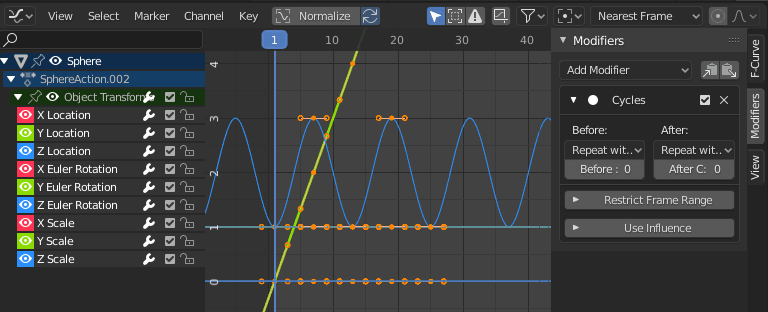
Blender combines modeling, sculpting, UV editing, rigging, animation, rendering, and compositing in a free, open-source application. You might model a game prop, unwrap it, build materials, and render a portfolio turntable without purchasing another core application.
Blender also includes two rendering engines: EEVEE and Cycles. Cycles supports production rendering, while EEVEE emphasizes speed and interactive feedback. If you have a specific requirement, such as compatibility with an existing pipeline, a third-party renderer is available.
Main trade-off
Navigation, modes, shortcuts, and the number of available tools can make the first projects demanding. Start with one small asset and learn only the operations needed to finish it.
Maya: Best for Character Modeling and Animation Pipelines

Maya is worth considering when a model needs to move through character production: modeling, retopology, UV work, rigging, animation, and rendering. Maya works better when those stages must work together across a team.
For an animated character, surface detail is only part of the job. The mesh also needs topology that deforms predictably around joints and facial features. Maya’s combination of modeling, rigging, and animation tools makes it relevant to that wider production process.
Material preview is available. Viewport 2.0 can display materials, lighting, shadows, and other effects interactively, although viewport output and final rendering can differ. See Autodesk’s Viewport 2.0 documentation.
Main trade-off
Maya requires substantial learning time and paid access. Its strongest justification is a character or animation workflow that uses its broader capabilities, particularly when collaborators already work in Maya.
Cinema 4D: Best for Motion Graphics

Cinema 4D is particularly relevant to motion designers creating title sequences, product animations, broadcast graphics, and repeated or abstract forms.
Its MoGraph toolset provides the distinction. Cloners, Effectors, and Fields let artists build and control procedural arrangements—for example, a grid of objects that changes position, scale, or rotation across an animation.
Cinema 4D also offers conventional modeling, materials, simulation, and animation tools. Current new subscriptions include Redshift GPU, connecting scene creation with GPU rendering.
Main trade-off
Account for both the subscription and your rendering setup. Redshift also has its own hardware requirements, which can be stricter than those of Cinema 4D itself.
ZBrush: Best for Detailed Character and Creature Sculpting

ZBrush is a specialist choice for artists creating characters, creatures, collectibles, and other models with complex organic forms. Its brush-based workflow supports work on anatomy, folds, skin, and fine surface detail.
Tools such as DynaMesh help artists develop forms while remeshing the surface. ZRemesher provides automatic retopology tools, although production topology still need further work.
A detailed sculpt is an intermediate asset in many pipelines. A game character may still need a lower-resolution mesh, UVs, and baked maps. An animated character also needs suitable deformation topology and rigging.
ZBrush can also be useful for printable figures, provided the model receives the necessary checks for scale, thickness, and printable geometry.
Main trade-off
Budget time for its interface and for the preparation required after sculpting. ZBrush are most valuable when sculptural form and detail are central to the project.
Fusion 360: Best for Functional Parts and 3D Printing

Autodesk Fusion, commonly known as Fusion 360, is a practical choice for dimension-driven products, mechanical components, and functional 3D prints. Its parametric workflow helps when a design must change without rebuilding the entire model.
Consider a mounting bracket: hole spacing, thickness, and other dimensions may need several revisions before the part fits. Sketch constraints, editable features, and assemblies help manage those changes. Fusion also connects design with manufacturing tools.
For printing, verify the model’s dimensions and mesh export, then prepare it in a suitable slicer or supported manufacturing workflow. Fusion also supports offline work with cached designs for a limited period, up to two weeks according to Autodesk.
Fusion offers a restricted free personal-use license for qualifying noncommercial users. Compare its limitations with the paid version before a project.
For a closer look at creative modeling versus mechanical CAD, read our Blender vs. Fusion 360 comparison.
How to Choose Between These 3D Modeling Tools
Before committing to a subscription or a long learning course, we recommend you to test one small project that resembles your actual work.
- Define the deliverable. An animated character, editable engineering part, room model, and printable sculpture have different requirements.
- Check the handoff. Confirm the file formats your client, game engine, slicer, or manufacturing partner accepts. Test an export early; geometry transfer does not guarantee that materials, rigs, or editing history will transfer.
- Calculate the working cost. Include required plugins, renderers, training, and hardware alongside the application license. Compare free-license restrictions with your intended use.
- Test your bottleneck. Evaluate modeling responsiveness, sculpting, animation playback, or rendering according to the work you expect to do.
When using these 3D modeling programs, people often complain about the slow rendering time, frequent crashes, and high system requirements caused. Instead of being struck by integrated renderers, another solution is to use a render farm like Fox Renderfarm.
When Does Cloud Rendering Become Useful?
Once your models are ready, final rendering can become a separate capacity problem. A workstation may handle scene creation comfortably while taking too long to finish an animation sequence or a batch of large images. Our guide to how cloud rendering works explains the process.
Fox Renderfarm provides remote rendering for supported workflows, including major 3D software such as 3ds Max, Maya, Blender, and Cinema 4D. It applies high-performance servers to handle your projects. No more crashes when rendering large-scale and complex rendering tasks.
CPU and GPU rendering are both available. The best part about Fox Renderfarm is the thousands of render nodes, which deliver fast rendering speed. These render nodes can break down rendering tasks and render them simultaneously.

FAQs about 3D Modeling Software
What is the best 3D modeling software for beginners?
SketchUp is a practical starting point for rooms and architectural concepts. Blender suits beginners who want a free route into general 3D creation and are prepared for a broader learning curve. Fusion is more suitable when the first project is a dimension-driven functional part.
Can free 3D modeling software be used commercially?
It depends on the license. Blender permits commercial use. SketchUp Free excludes commercial use, while Autodesk Fusion’s free personal-use option is restricted to qualifying noncommercial work. Check the terms of the exact product you use.
Which software should I choose for 3D printing?
Choose Fusion for dimension-driven parts such as brackets, enclosures, and mechanical components. ZBrush suits detailed figures and organic sculptures, while Blender can handle many creative mesh projects.


 Ryan Thompson
 Ryan Thompson
 Ryan Thompson


