
 Blender
 Cinema 4D
 Arnold
 3ds Max
 Houdini
 V-Ray
V-Ray Maya
Maya Unreal Engine
 Nuke
NukeContents
What Is Cloud Rendering? How It Works, Benefits, and Use Cases
 Ryan Thompson
Cloud rendering is the process of sending rendering tasks to remote high-performance servers instead of relying only on your local computer. In 3D production, cloud rendering can reduce wait times and free up local machines for other work.
Today, cloud rendering is used across animation, VFX, architectural visualization, product rendering, and game cinematics. As scenes become heavier and deadlines get tighter, many teams use cloud infrastructure to scale rendering capacity on demand rather than continuously upgrading in-house hardware.
What Is Cloud Rendering?
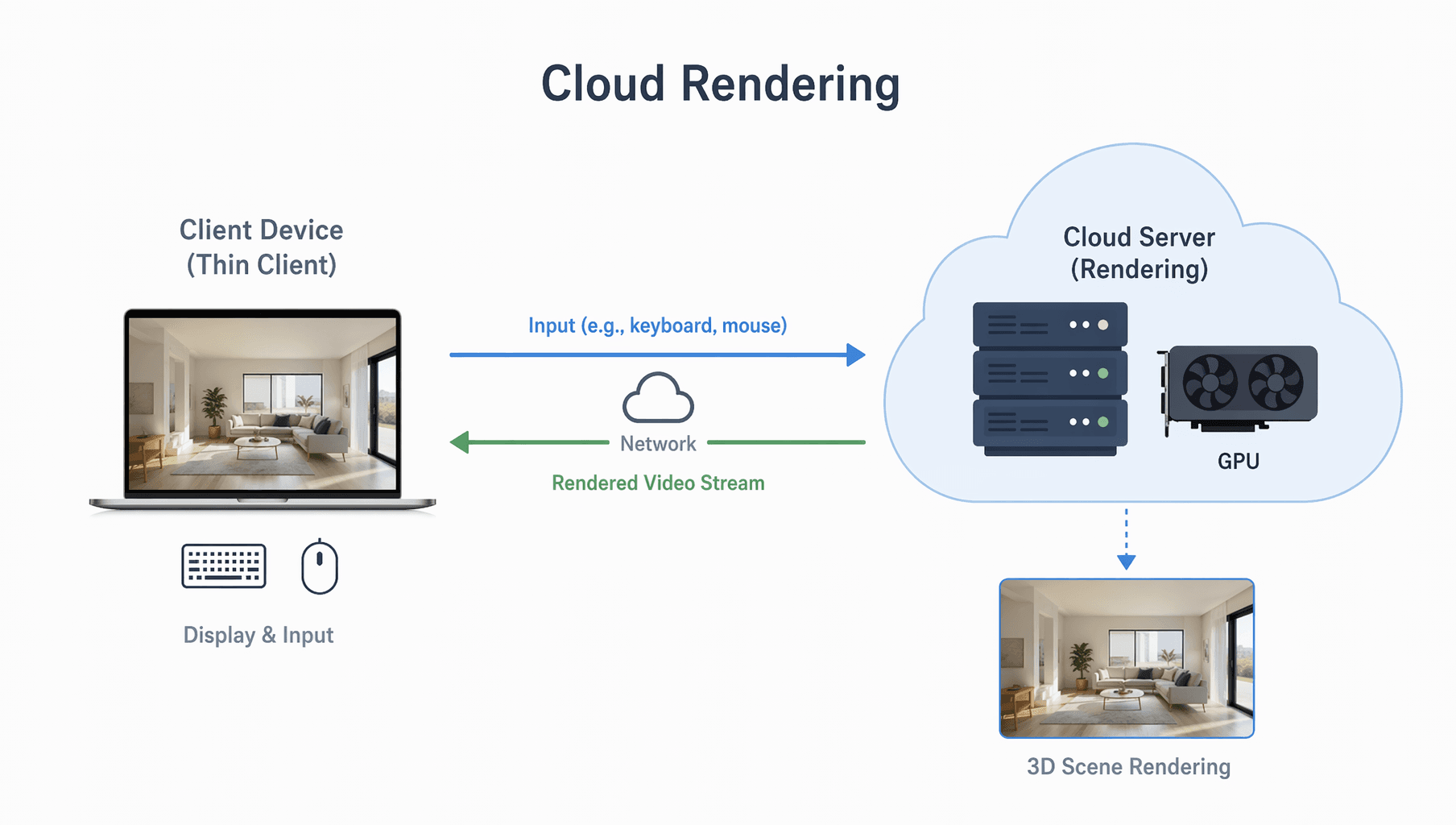
Cloud rendering is a rendering workflow in which computation happens on remote servers in the cloud rather than on your own workstation. In practical terms, you prepare a 3D scene in software such as Blender, Maya, 3ds Max, Cinema 4D, or Houdini, then submit that scene to a cloud rendering platform for processing.
In the CG industry, cloud rendering is most commonly associated with a cloud render farm, which distributes frames or tasks across many machines to complete jobs faster. This model is especially useful for animation sequences, high-resolution stills, and projects with heavy lighting, simulation, or texture demands.
Cloud Rendering vs Local Rendering
The biggest difference between cloud rendering and local rendering is where the actual computation happens.
With local rendering, your own PC or workstation handles the full job. This gives you direct control, but it also means long render times, higher hardware stress, and limited scalability.
With cloud rendering, remote machines do the heavy work. That means you can keep modeling, animating, or compositing on your local computer while the final rendering happens elsewhere.
If you are wondering whether your current machine is enough to start, this guide on computer requirements for cloud rendering is a useful follow-up.
In short, local rendering is best for quick previews, tests, and smaller projects. Cloud rendering is better for large jobs, deadline-driven work, and teams that need more rendering power without buying more hardware.
How Does Cloud Rendering Work?
A typical cloud rendering workflow is straightforward, even though the backend infrastructure is complex.
1. Prepare the Project Files
First, the artist finishes the scene setup locally. This includes models, textures, lighting, cameras, simulations, plug-ins, and render settings. Before submission, the project usually needs to be checked for missing assets and version compatibility.
2. Upload the Job to the Cloud
Next, the files are uploaded to the cloud rendering service. Depending on the platform, this can be done through a desktop client, web submission portal, or production pipeline integration.
3. Analyze and Allocate Resources
Once uploaded, the platform analyzes the job and assigns it to suitable render nodes. This step may involve checking software versions, plug-ins, render engines, frame ranges, and hardware requirements.
4. Render on Distributed Machines
The actual rendering is then distributed across multiple remote servers. For animation, frames are often split across different nodes so many frames can be rendered at the same time. This parallel processing is one of the biggest reasons a render farm can save so much time.
5. Download the Final Output
After rendering is complete, the final frames or sequences are made available for download. Artists can then review the output and move on to compositing, editing, or delivery.
If you want a broader service-evaluation perspective after learning the basics, this article on how to choose a cloud rendering service covers the next decision step.

Main Types of Cloud Rendering
Not all cloud rendering works in exactly the same way. In practice, there are two common categories users should understand.
Offline Cloud Rendering
Offline cloud rendering is the most common form used in animation, VFX, and archviz. It is designed for high-quality final frames rather than instant interaction. This is where cloud render farms are most useful, especially when rendering with engines such as Arnold, V-Ray, Redshift, or Blender Cycles.
Real-Time Cloud Rendering
Real-time cloud rendering is more commonly associated with interactive visualization, streaming, virtual experiences, and applications where users need near-instant feedback. It is different from traditional batch rendering because latency and responsiveness matter much more.
For most Fox Renderfarm readers, the more relevant workflow is offline cloud rendering for final image or animation output.
Benefits of Cloud Rendering
Cloud rendering has become popular because it solves several common production bottlenecks.
Faster Turnaround
The most obvious benefit is speed. Instead of rendering a long sequence frame by frame on one local machine, a cloud render farm can split the workload across many nodes.
Better Scalability
Cloud rendering lets you scale computing power based on project size. You do not need to maintain a large in-house render farm all year just to handle a few peak workloads.
Less Pressure on Local Hardware
Long rendering sessions can heavily load your CPU, GPU, RAM, and cooling system. Offloading final renders helps reduce that strain and keeps your workstation available for active creative work.
More Cost Flexibility
For freelancers, students, and small studios, renting render power only when needed can be more practical than constantly upgrading hardware. If you are comparing providers, this list of cloud render farms for 3D projects can help you understand the market landscape.
Easier Team Workflows
For distributed teams, cloud rendering can simplify collaboration by centralizing job submission and making it easier to manage render output across locations.
When Should You Use Cloud Rendering?
Cloud rendering is a strong fit when:
- your local renders are taking too long
- you need to deliver animation or large still-image batches on a deadline
- your workstation is good for creation but not ideal for final output
- you want to avoid buying expensive hardware for occasional peak workloads
- your team needs flexible render capacity across multiple projects
It is especially valuable for animation, VFX, product visualization, architectural rendering, and other production workflows where rendering can quickly become the main bottleneck.
Why Fox Renderfarm Makes Sense for Cloud Rendering Workflows
More importantly, it makes the learning curve easier for newer users while still offering the infrastructure needed by professional teams. That balance matters because many people searching “what is cloud rendering” are not just looking for a definition. They are trying to understand whether cloud rendering is practical for their real projects.

Let's take the Maya web submission process as an example, only 4 steps in Fox Renderfarm: submit > analyze > render > download. Check the tutorial video below.
Conclusion
Cloud rendering is the process of using remote cloud-based computing resources to render 3D scenes, animations, and visual content more efficiently than many local machines can handle alone. It works by uploading project files, distributing the render job across remote nodes, and returning the completed output once processing is finished.
For artists and studios dealing with larger scenes, tighter deadlines, or limited local hardware, cloud rendering can be a practical way to scale production without building an in-house render farm. And once you understand the workflow, the next step is not just knowing what cloud rendering is, but choosing the right cloud rendering service for your pipeline.
Ready to Try Fox Renderfarm?
See why 400k+ CG studios and artists rely on Fox Renderfarm


Recommended reading
You May Also Like

Does Cloud Rendering Have Strict Computer Requirements?
Cover artwork by Kay John Yim Does Rendering Have Negative Effects on Computers?Rendering refers to the process of converting a three-dimensional comp
2023-12-13
5 Best Cloud Rendering Farms for 3D Projects
In today's digital age, cloud rendering has revolutionized the way we create and view stunning visual content. Whether you're a professional animator
2024-08-08

How to Choose Cloud Rendering Service?
IntroductionAre you tired of waiting hours or even days for your computer to render complex graphics or animations? Well, look no further because we'v
2023-12-13



