Blender
 Cinema 4D
 Arnold
 3ds Max
 Houdini
 V-Ray
V-Ray Maya
Maya Unreal Engine
 Nuke
NukeKeyShot Tutorial: How to Render a Teapot in KeyShot 9
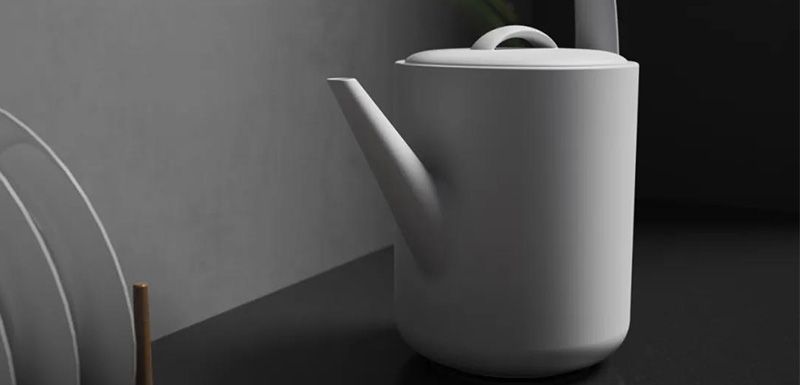
In this article, the best render farm and cloud rendering services provider, Fox Renderfarm will share with you a tutorial from 3d artist Drowm about how to render a teapot in Keyshot 9.
Introduction
Creative products are one of the product categories that students need to do at present, so we will render a creative teapot today.
Rendering Process
Prepare the model to be rendered, and then import flowers and plants later and adjust them according to the viewing angle.

Import to KeyShot 9.

Adjust the aspect ratio and determine the camera.

Adjust the attributes and colors of some simple materials in preparation for lighting.

Adjust the lighting preset to the product and adjust the image preset to the photography fine contrast.


The next step is to start lighting. Add an ambient light and adjust the ambient light to sunlight.

Customize the position of the sun, adjust the azimuth and inclination angle to a more appropriate angle.

Since our projection was too full before, we need to adjust here by increasing the size of the sun.

The whole scene is affected by ambient light and turns yellow and blue so we reduce the saturation of ambient light.

Adjust the material of the pot, darken the diffuse reflection of the pot, turn on the highlight to adjust the roughness.

Adjust the desktop material. Here, we can use texture noise to simulate the feeling of broken points.

Adjust the size and color of the noise, and turn on the highlight to increase the roughness a little.

Adjust the texture of the wall and give a map to diffuse reflection. Here, we use color adjustment to make the map achieve the effect we need. Then, reduce the contrast and the brightness.
Adjust the wood texture material. Find a wood texture map and adjust the color of this map to make it consistent with the figure.
Stick bright yellow wood grain in the same way.
At this time, we found that the shadow of the pot was not in the right position, and we adjusted the azimuth of the sun again to make the shadow in the right position.
Add a flower model and give the corresponding map file.
Adjust the size and position of flowers and plants to a suitable position.

Adding a depth of field effect, wherein the focus is the jar, so that the flowers and plants in front are blurred,


Fox Renderfarm hopes it will be of some help to you. As you know, Fox Renderfarm is an excellent cloud render farm in the CG world, so if you need to find a render farm, why not try Fox Renderfarm, which is offering a free $25 trial for new users? Thanks for reading!