
 Blender
 Cinema 4D
 Arnold
 3ds Max
 Houdini
 V-Ray
V-Ray Maya
Maya Unreal Engine
 Nuke
NukeTop 5 3D Architecture Software in 2026 for Beginners and Pros
 Ryan Thompson
Choosing the right 3D architecture software can be difficult, especially with so many options available in 2026. Beginners often look for tools that are easy to learn, while professionals need more advanced features for complex projects.
The right software can improve both workflow speed and design quality. In this guide, we review the top 5 3D architecture software tools and compare their features, usability, and performance to help you choose the best option for your needs.
Part 1. Key Features to Look for in 3D Architecture Software
Before choosing a 3D architecture software, it’s important to understand which features matter most. Different tools focus on different workflows, from simple modeling to full BIM-based design.
Here are the key features to consider when selecting the right software for your projects:
>> Related: Architectural Rendering: Everything You Need to Know
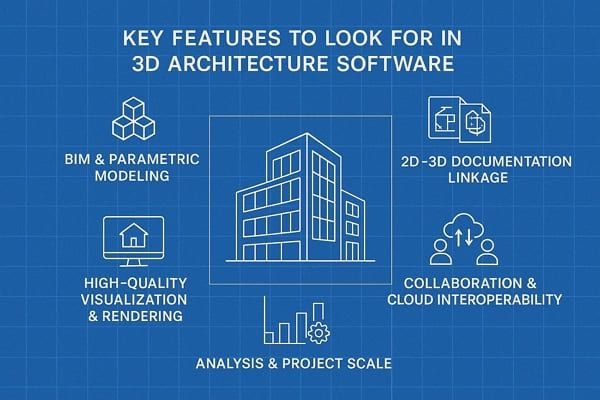
- BIM and Parametric Building Modeling: Locate a software that uses real building elements like walls, slabs, and windows instead of simple 3D shapes. If you have these options, you will be able to edit dimensions and automatically update sections and schedules, including material and cost support, for full building lifecycle use.
- 2D–3D Documentation Linkage: The right software should keep your 2D drawings and 3D model fully connected and synchronized. So, when the model changes, floor plans, sections, and elevations update automatically and can be exported to formats such as DWG, IFC, and PDF.
- High-Quality Visualization and Rendering: Your chosen software must provide real-time 3D views with lighting and shadow previews to improve design understanding. Furthermore, it should support photorealistic rendering, materials, and easy control of people and time for strong client presentations.
- Collaboration, Cloud, and Interoperability: Architecture software should enable real-time or cloud-based teamwork, allowing multiple users to work on the same project. In addition, it must support version control and file formats such as IFC, RVT, DWG, SKP, and FBX to enable smooth coordination.
- Analysis, Performance, and Project Scale: Good software helps test daylight, energy use, and thermal performance to improve design decisions early. Therefore, it must handle complex projects smoothly and provide reports on quantities, costs, and buildability planning.
Part 2. 5 Best 3D Architecture Tools in 2026
There are many 3D architecture tools available today, each designed for different skill levels and project types. Some focus on simplicity for beginners, while others offer advanced features for professional workflows.
Below are the top 5 3D architecture software options in 2026, selected based on usability, features, and overall performance.
1. Cedreo
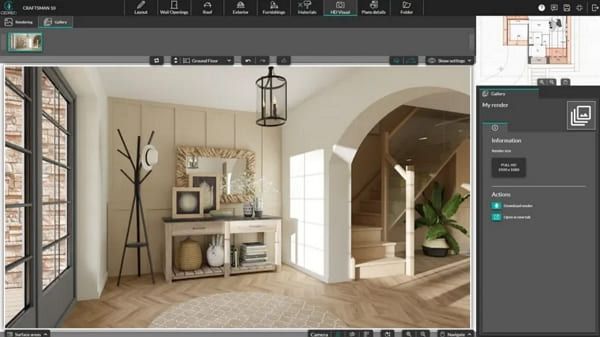
This is a cloud-based software that lets you create complete 2D floor plans and photorealistic 3D renderings within a limited duration. In this regard, users can access thousands of customizable, ready-to-use furniture items, materials, and textures for both interior and exterior styling. For project management, you can create, duplicate, and modify multi-story projects, including basements and rooftops, with drag-and-drop tools.
Key Features
- Adjust natural lighting based on geographic orientation and time of day to ensure accurate rendering.
- Provides tools to handle varied terrain, including earth retention and embankment modeling.
- Automatically calculates surface areas and supports 2D blueprint exports.
Cons
- Lacks the deep customization options found in SketchUp or Revit.
- Can’t generate detailed, engineering-grade CAD documentation and construction blueprints.
2. SketchUp
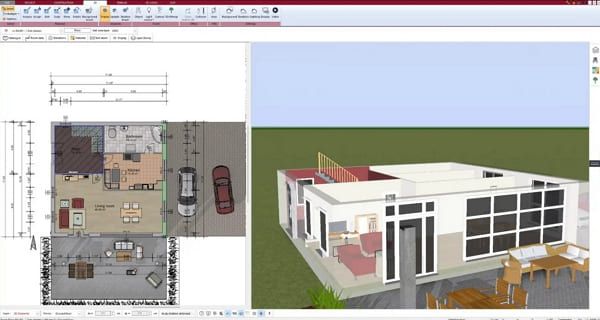
Using this best 3D architectural design software, you can leverage “pencil-like” rapid conceptual modeling with quick design iteration. Its main features include the push/pull tool for rapid volume creation, an extensive 3D Warehouse for assets, and third-party extensions for advanced rendering and analysis. Besides, its push/pull defining feature allows any flat 2D surface to be immediately extruded into a 3D volume, making it easy to create walls or windows.
Key Features
- LayOut creates 2D construction drawings, which automatically update when the 3D model changes.
- Includes precise measurement and scaling tools for accurate architectural modeling.
- The Follow Me Tool lets you create complex 3D shapes by extruding profiles along a defined path.
Cons
- While SketchUp has LayOut, it is less advanced, less automated, and less precise.
- Struggles with complex, organic, or non-linear geometries and lacks native, advanced 3D tools.
3. Sweet Home 3D
It's one of the best architecture 3d modeling software that is a free, open-source interior design application. It allows you to draw walls and place objects on a 2D plan while viewing the results in real-time 3D. Regarding preview options, it offers both aerial and virtual visitor perspectives, where users can also change colors, textures, and sizes. Using the extensive Furniture Catalog, you can search for items categorized by room type, like kitchen.
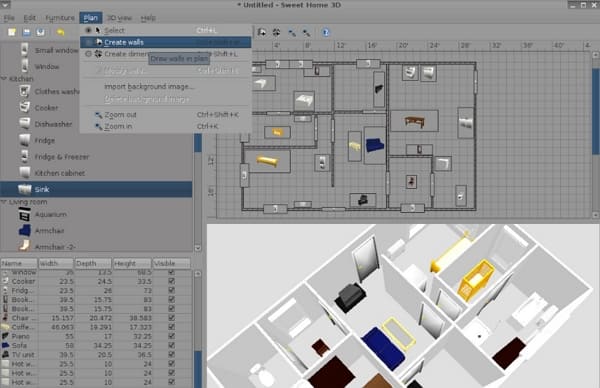
Key Features
- Users can import additional 3D models and textures and export work in OBJ or PNG formats.
- Being open source, it offers extensive community-supported 3D models, textures, and plugins.
- Easily work on various systems like Windows, macOS, and Linux, ensuring flexibility for users.
Cons
- The default furniture catalog is somewhat dated and limited.
- Lacks advanced engineering features like HVAC planning or precise structural calculations.
4. Vectorworks Architect
Vectorworks Architect is also the best 3D architectural software because it's a comprehensive Building Information Modeling and CAD software. It is developed to support the entire architectural process, and its hybrid environment lets users work in 2D and 3D, with 2D drawings automatically reflected in a 3D model. For subdivision modeling, this software uses Pixar’s OpenSubdiv technology, allowing you to create complex, sculptural shapes by manipulating the cage around the 3D object.
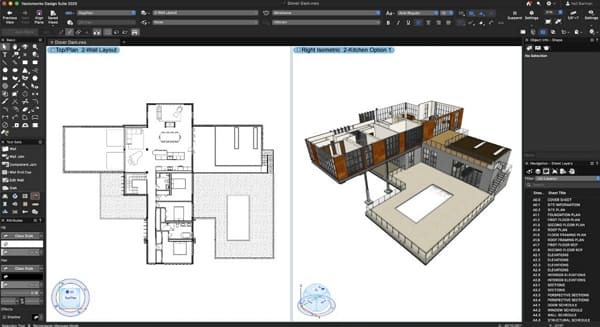
Key Features
- Innovative NURBS tools are there to create, edit, and analyze intricate or sinuous surfaces.
- With “Maximize the I in BIM,” data reporting automatically generates and updates worksheets and schedules.
- OpenBIM compliance, which supports IFC and allows for export/import in DWG, RVT, SKP, 3DM, etc.
Cons
- It needs a steep learning curve, features too many menus and dialog boxes.
- Vectorworks Architect struggles with efficient, high-level BIM collaboration.
5. FreeCAD
You can also opt for this best 3D rendering software for architecture if you need an open source, parametric 3D modeler. In addition, you can achieve full IFC compatibility for BIM, Python scripting for customization, and a robust sketcher for 2D-to-3D design. Using the BIM Workbench feature, users can design structural elements such as walls and beams, which can be exported as IFC files for compatibility with other software.
>> Related: 6 Free CAD Software for Students and CAD Beginners
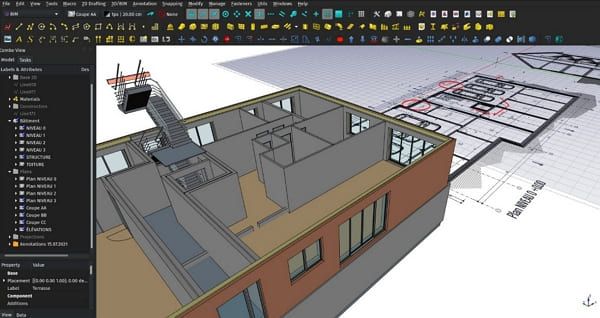
Key Features
- Parametric modeling changes design by adjusting parameters, automatically updating the whole model accordingly.
- Has a TechDraw workbench to generate 2D drawings, blueprints, and sections from 3D models.
- Reads and writes multiple formats like STEP, IGES, STL, SVG, DXF, and IFC.
Cons
- Modifying earlier steps in a project often breaks subsequent modeling steps.
- Unlike Revit or AutoCAD, specialized architectural features might feel less refined.
Part 3. How to Improve Rendering Quality in 3D Architecture
After choosing the right 3D architecture software, the final rendering stage determines how realistic and professional your project looks. Lighting, shadows, and textures all play a key role in the final output, but achieving high-quality results often requires significant computing power, especially for large or detailed scenes.
To handle this, many architects and designers use a render farm like Fox Renderfarm. Instead of relying on local hardware, Fox Renderfarm processes rendering tasks on powerful remote servers, helping reduce render time and improve stability.
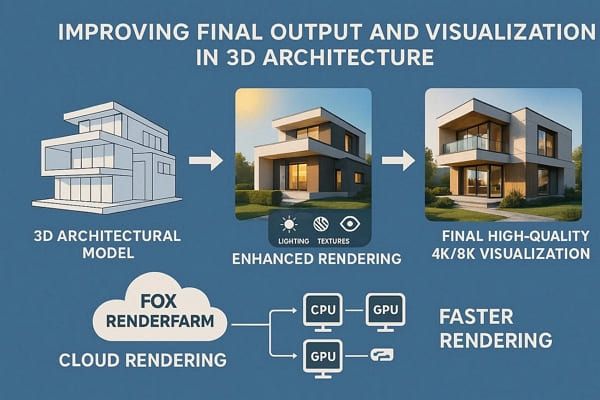
Fox Renderfarm supports major 3D and architectural visualization tools, such as Blender, 3ds Max, Maya, making it easy to integrate into existing workflows. By distributing rendering tasks across multiple CPU and GPU nodes, it can handle complex scenes and high-resolution outputs more efficiently.
You can also watch the video below to see how to use Fox Renderfarm in a real workflow.
FAQs about 3D Architecture Software
1. Why do architects use 3D architecture software?
Architects use it to turn ideas into realistic 3D building models before construction. Hence, it helps them visualize designs, find errors early, and improve project accuracy.
2. Is BIM important in architecture software?
Yes, BIM is important because it connects design with real building data. Thus, it helps users manage materials, costs, and building lifecycle in a single smart model.
3. Can beginners learn 3D architecture software easily?
Yes, they can learn 3D architecture software easily by using options like SketchUp and FreeCAD. This is because they offer simple interfaces and help users learn modeling stepwise.
4. Why is rendering important in architectural design?
Rendering is important in architectural design because it turns 3D models into realistic images with accurate lighting, materials, and textures. This helps clients clearly understand the final result, improves communication, and supports better design decisions. For complex projects, using a render farm can also help speed up the rendering process.
Conclusion
In conclusion, choosing the right 3D architecture software depends on your workflow, skill level, and project requirements. Each tool offers different strengths, from simple modeling to advanced architectural design and visualization.
For projects that require high-quality rendering, performance can become a key limitation. In such cases, a render farm like Fox Renderfarm can help speed up rendering and handle complex scenes more efficiently, improving overall visualization results.


 Ryan Thompson
 Ryan Thompson
 Ryan Thompson


