
 Blender
 Cinema 4D
 Arnold
 3ds Max
 Houdini
 V-Ray
V-Ray Maya
Maya Unreal Engine
 Nuke
NukeBest Laptop for 3D Modeling and Rendering: 5 Picks for 3D Artists

Buying a laptop for 3D work is more complicated than it first appears. Many machines look strong on paper, but real-world rendering depends on more than headline specs. Heat, GPU performance, RAM, storage speed, and display quality all affect whether a laptop feels smooth once projects get heavier.
If you are looking for the best laptop for rendering in 2026, the smartest approach is to choose based on your workflow. In this guide, we will cover what matters most, which laptops are worth considering, and when cloud rendering is a better choice than paying more for hardware alone.
Part 1. What Makes a Good Laptop for Rendering?
A good rendering laptop is not just a thin machine with a flashy screen. It needs enough sustained performance to handle long sessions in 3D software without slowing down too quickly. Here are the specs that matter most:
1. CPU Performance
For 3D modeling, simulation prep, and scene interaction, CPU speed still matters a lot. A strong modern processor helps keep your viewport responsive and makes everyday work smoother. If you are still comparing where performance matters most, this guide on CPU vs GPU rendering gives a useful breakdown.
2. GPU Power
If you render in Blender Cycles, Redshift, Octane, or other GPU-heavy tools, the graphics card matters just as much as the processor, and sometimes more. A stronger laptop GPU can improve viewport performance, reduce render times, and make heavy scenes feel less cramped.
3. RAM
For serious 3D work, 16GB is no longer the comfortable target it used to be. It is the bare minimum for lighter work. For most artists, 32GB is the better baseline, while 64GB is much more comfortable for larger projects.
4. Storage
A rendering laptop should have fast SSD storage, ideally 1TB or more. Large scenes, texture libraries, caches, and project backups fill space faster than most people expect.
For artists who mainly work in Autodesk Maya, it is also worth checking the detailed Maya system requirements so you do not buy a laptop that looks strong on paper but struggles with real Maya scenes.
5. Display and Cooling
A good display helps with color work, lighting judgment, and long sessions. Good cooling matters just as much. Many laptops look great in spec sheets but lose performance under long renders because they run too hot.
Part 2. Our 5 Picks for the Best Laptop for Rendering
The current top-ranking articles for this topic tend to favor a mix of creator laptops, gaming laptops, and mobile workstations. That makes sense, because 3D artists do not all need the same kind of machine. Some want battery life and display quality, while others want raw GPU power above all else.
1. MacBook Pro 16 (M4 Pro)

If you want the best all-around laptop for rendering, 3D modeling, and creative work, the MacBook Pro 16 is still one of the easiest recommendations. It is not the cheapest option, but it balances performance, battery life, display quality, and day-to-day usability better than most laptops in its class.
It is especially strong for artists who want a premium machine that feels fast and stable for long work sessions. The display is excellent, the battery life is genuinely useful, and the overall experience is polished in a way many Windows laptops still struggle to match. The main caution is software compatibility, because some 3D tools and plug-ins are still more flexible on Windows.
Best for: creators who want the strongest all-around experience
Why it stands out: strong sustained performance, superb display, excellent battery life
Watch out for: premium price and fewer upgrade options
2. ASUS ProArt P16
The ASUS ProArt P16 is one of the most balanced Windows options for artists who want serious creative performance in a more creator-focused design. It feels more purpose-built for visual work than many gaming laptops, which makes it appealing if you care about both rendering performance and screen quality.
This is a good choice for people working across 3D modeling, animation, texturing, motion graphics, and digital art. It gives you strong GPU support without feeling overly gamer-branded, and that matters for many freelance artists and studio creatives.
Best for: 3D artists who want a creator laptop rather than a gaming look
Why it stands out: strong display, good GPU balance, creator-friendly design
Watch out for: battery life under heavy workloads will still be limited
3. Alienware 16 Area-51
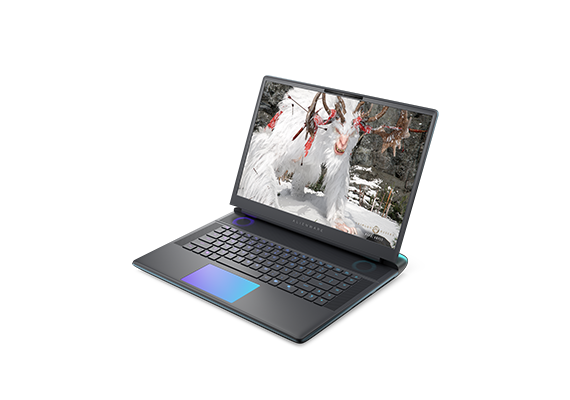
If your top priority is raw GPU power in a laptop, Alienware 16 Area-51 is one of the more obvious high-end options right now. This is the kind of machine for users who want desktop-replacement energy and are willing to accept extra size, noise, and price in exchange for more graphics horsepower.
It makes the most sense for artists working in GPU-rendered workflows, heavier Blender scenes, or demanding animation projects where viewport speed matters. It is not the laptop I would recommend to everyone, but if performance is the only thing you care about, it belongs on the shortlist.
Best for: users who want top-tier mobile GPU performance
Why it stands out: powerful graphics options and strong heavy-workload potential
Watch out for: weight, heat, battery life, and cost
4. Dell Pro Max 18 Plus

For users who want a true mobile workstation, the Dell Pro Max 18 Plus is closer to a professional production machine than a casual creator laptop. This kind of system is aimed at people working with heavier professional scenes, more advanced pipelines, and workstation-class expectations.
It is especially relevant if your 3D work overlaps with CAD, simulation-heavy workflows, or large production files. It is not the most mainstream pick, but it makes sense for users who know they need workstation-level stability and resources.
Best for: professional users who need workstation-class hardware
Why it stands out: large screen, serious performance ceiling, pro-oriented positioning
Watch out for: price and portability trade-offs
5. ASUS V16
Not everyone shopping for the best laptop for rendering is ready to spend premium workstation money. The ASUS V16 is one of the more realistic entry points if you want a budget-friendly machine that can still handle beginner-to-intermediate 3D work.
It is a much better fit for students, hobbyists, and early-career artists than for high-end production. But that does not make it a bad choice. In fact, for lighter Blender work, learning projects, and smaller renders, a budget laptop like this can be the smarter buy. If you are just getting started, this guide to free 3D modeling software may also help you build a more practical beginner setup around your laptop choice.
Best for: students and budget-conscious creators
Why it stands out: better value than premium creator laptops
Watch out for: less headroom for large or long rendering jobs
Laptop or Desktop: Which Is Better for Rendering?
To be honest, if pure rendering speed is your only goal, a desktop is still the better choice. It cools better, upgrades more easily, and usually gives you more performance for the money. A laptop wins when you need portability, flexibility, and the ability to work from different places.
That is why the best laptop for 3D modeling and rendering is usually not the “most powerful laptop on earth.” It is the machine that gives you enough performance without becoming too expensive, too loud, or too impractical to carry. If you are still deciding between mobile and desktop setups, this related guide on the best PC for 3D modeling and rendering is worth reading too.
How to Render Faster Without Buying the Most Expensive Laptop?
A lot of artists make the same mistake: they try to solve every rendering problem by buying a bigger laptop. That works for a while, but only up to a point. Once your scenes become more complex, even strong laptops start to feel limited, especially during final-frame rendering.
That is where a render farm becomes practical. Instead of forcing your laptop to handle every heavy job locally, you can keep your machine focused on modeling, scene setup, animation, and revisions while offloading final renders to the cloud. If you are new to that workflow, this beginner guide on how to choose a cloud rendering service is a good place to start.
This approach makes even more sense for laptop users than for desktop users, because laptops hit thermal and power limits sooner. It also helps if you are wondering whether your machine is “good enough” to start with, because in many cases it is. This article on cloud rendering computer requirements explains that side of the decision well.
And if you mainly work in Blender, this beginner guide on rendering animation in Blender is another practical next step.
Should You Use Fox Renderfarm with a Rendering Laptop?
If you work on a laptop, using a render farm is often less about luxury and more about workflow sanity. A laptop is great for creating, testing, and iterating, but long final renders can tie it up for hours, push thermals hard, and slow down the rest of your work.
That is why many artists pair their local machine with Fox Renderfarm instead of trying to buy the absolute most expensive laptop possible. It supports major 3D software, offers both CPU and GPU rendering, and gives you a way to scale when your project grows beyond what mobile hardware handles comfortably.

Conclusion
Best laptop for rendering in 2026 depends on your workflow more than marketing claims or peak specs. Some artists need a balanced creator laptop, while others care more about GPU power, portability, or budget.
A practical approach is to buy the strongest laptop you can reasonably use every day, then use tools like render farm when local hardware starts to slow you down. For most 3D artists, that balance is more useful than chasing the most expensive machine on the market.